The last part answers the question that arrives once the tables are right: how do people
find things in them? A search box over the clinic's documents, first with LIKE
and then with an index that understands words; a report over the normalised tables that
Part 7 promised; and the finished schema, every table from the series in one script for
each engine, with a diagram and a twelve-rule checklist to take to the next project.
- Download p12-sqlserver.sql or p12-postgresql.sql and run it as in Part 1
- Section 2:
LIKE 'Fever%'seeks an index and reads 2 pages on SQL Server;LIKE '%fever%'scans 545; on PostgreSQL every LIKE scans until the pattern or trigram index exists - Section 3: PostgreSQL finds "Fever in children" for
fever & childthrough a GIN index; LocalDB answersCannot use full-text search in user instance - Section 4: six report rows, and Dr. Hannah Weber's average wait on 24 September is 27 minutes
- Section 5: the materialised view says 2 until the refresh, then 3; the SQL Server indexed view says 3 at once but only the NOEXPAND plan reads it
- Then run the finished schema for SQL Server or for PostgreSQL: 20 tables, 20 foreign keys, a clinic morning through every one of them, and an invoice that totals 26.08
LIKE, and what an index can do for it
Section 1 loads ten clinic documents, seven public and three for staff, and 20,000
archive notes so that the plans mean something. Section 2 searches the title. Starting
with a word is a range, and SQL Server seeks it: Index Seek ... SEEK:([title] >=
N'Fever' AND [title] < N'FeveS'), 2 logical reads. Containing a word is not a range,
and no normal index helps: LIKE '%fever%' on the title reads the whole index,
137 pages, and on the body the whole table, 545. PostgreSQL adds a twist for the first
case: under the database's en_US.utf8 collation a plain index cannot serve even
LIKE 'Fever%', and the plan is a Seq Scan with Rows Removed by
Filter: 20009 until the index is built with the pattern operator class:
CREATE INDEX ix_knowledge_documents_title_pattern ON knowledge_documents (title varchar_pattern_ops);

 Index Scan using ix_knowledge_documents_title_pattern on knowledge_documents  (cost=0.29..8.31 rows=2 width=27) ...
   Index Cond: (((title)::text ~>=~ 'Fever'::text) AND ((title)::text ~<~ 'Feves'::text))
 Execution Time: 0.017 ms
And a second twist in PostgreSQL's favour: the pg_trgm extension, which ships
with the server, indexes three-letter fragments, and a GIN index on it does serve a
contains search. body LIKE '%fever%' went from a 346-buffer sequential scan to
a Bitmap Index Scan on ix_knowledge_documents_body_trgm touching 8 buffers. SQL
Server has no equivalent; the contains search there needs the full-text engine. One more
difference showed up in the results: PostgreSQL's LIKE is case-sensitive, so
'%fever%' found one title where SQL Server's case-insensitive collation found
two; ILIKE is the PostgreSQL spelling for the other behaviour.
Full-text search: words, not characters
A search box wants "vaccine" to find "vaccinations" and "fever child" to find "Fever in
children". That is a different tool from LIKE: a parser that reduces words to
stems and drops the ones that carry no meaning. Section 3 shows PostgreSQL's:
SELECT to_tsvector('english', 'Childhood vaccinations are given on Tuesday and Thursday mornings');
 'childhood':1 'given':4 'morn':9 'thursday':8 'tuesday':6 'vaccin':2
"are", "on" and "and" are gone, "vaccinations" became vaccin, and so does
"vaccine" when the query is parsed the same way. The search column is generated from the
title and the body, with the title weighted higher, and indexed with GIN:
ALTER TABLE knowledge_documents ADD COLUMN search tsvector GENERATED ALWAYS AS (
    setweight(to_tsvector('english', title), 'A') || setweight(to_tsvector('english', body), 'B')
) STORED;
CREATE INDEX ix_knowledge_documents_search ON knowledge_documents USING gin (search);
A search for vaccination OR fever through websearch_to_tsquery ranks
the two title hits above the two body hits, and ts_headline returns a snippet
with the matches marked. The plan for fever & child is a
Bitmap Index Scan on ix_knowledge_documents_search, 6 buffers:
 id |                 title                 | ts_rank
----+---------------------------------------+---------
  2 | Fever in children                     |  0.3479
  3 | Vaccination schedule                  |  0.3479
  8 | Staff: fever triage at the front desk |  0.3344
 10 | Staff: vaccine fridge temperature     |  0.3344
SQL Server has a full-text engine too, with CONTAINS and
FREETEXTTABLE, and the script runs the statements so that you see what LocalDB
does with them:
Msg 9982, Level 16, State 100, Line 1
Cannot use full-text search in user instance.

Msg 7601, Level 16, State 2, Line 1
Cannot use a CONTAINS or FREETEXT predicate on table or indexed view 'knowledge_documents' because it is not full-text indexed.
FULLTEXTSERVICEPROPERTY('IsFullTextInstalled') returns 0 here. Full-text search
is a feature of the full SQL Server editions, installed as an option, and a LocalDB or a
default Express install does not have it; the syntax in the script is what you would run
where it does. Search by meaning rather than by word, the kind that finds "Fever in
children" for "my child is hot and tired", is a third tool again, and season four built
it on pgvector in its
sixth part.
The report, as a view
Part 7 normalised the clinic and promised the flat report shape back through a view. Section 4 delivers it over doctors, appointments and queue entries:
CREATE VIEW daily_queue_report AS
SELECT (a.starts_at AT TIME ZONE 'UTC')::date AS day,
       d.full_name AS doctor,
       count(*) AS appointments,
       count(*) FILTER (WHERE a.status = 'Done') AS done,
       count(*) FILTER (WHERE a.status = 'NoShow') AS no_shows,
       count(*) FILTER (WHERE a.status = 'Cancelled') AS cancelled,
       round(avg(extract(epoch FROM q.called_at - q.checked_in_at) / 60), 1) AS avg_wait_min
FROM appointments AS a
JOIN doctors AS d ON d.id = a.doctor_id
LEFT JOIN queue_entries AS q ON q.appointment_id = a.id
GROUP BY 1, 2;

    day     |      doctor      | appointments | done | no_shows | cancelled | avg_wait_min
------------+------------------+--------------+------+----------+-----------+--------------
 2026-09-24 | Dr. Elena Rossi  |            3 |    2 |        1 |         0 |         16.0
 2026-09-24 | Dr. Hannah Weber |            1 |    1 |        0 |         0 |         27.0
Six rows in all, identical on SQL Server, which spells the conditional counts as
SUM(CASE WHEN ... THEN 1 ELSE 0 END) and the day as CAST(a.starts_at AS
DATE). A view costs nothing to store and is always current, because it is the query.
When the query is heavy and the screen is busy, section 5 stores the result, and here
the engines take different bargains. PostgreSQL's MATERIALIZED VIEW accepts any
query and is stale until told otherwise: after one new booking the view said 3 and the
materialised view said 2, until REFRESH MATERIALIZED VIEW CONCURRENTLY, which
needs a unique index on the view and keeps the old rows readable while it runs. SQL
Server's indexed view is maintained on every write and never stale, at the price of
strict rules, each of which the script breaks once: it must be schema-bound
(Msg 1939), it cannot contain an outer join (Msg 10113), and it needs
COUNT_BIG(*) and no AVG. The one that works counts per doctor and day,
and outside Enterprise edition a query reads it only with WITH (NOEXPAND);
without the hint the plan recomputed from the base table.
The finished schema
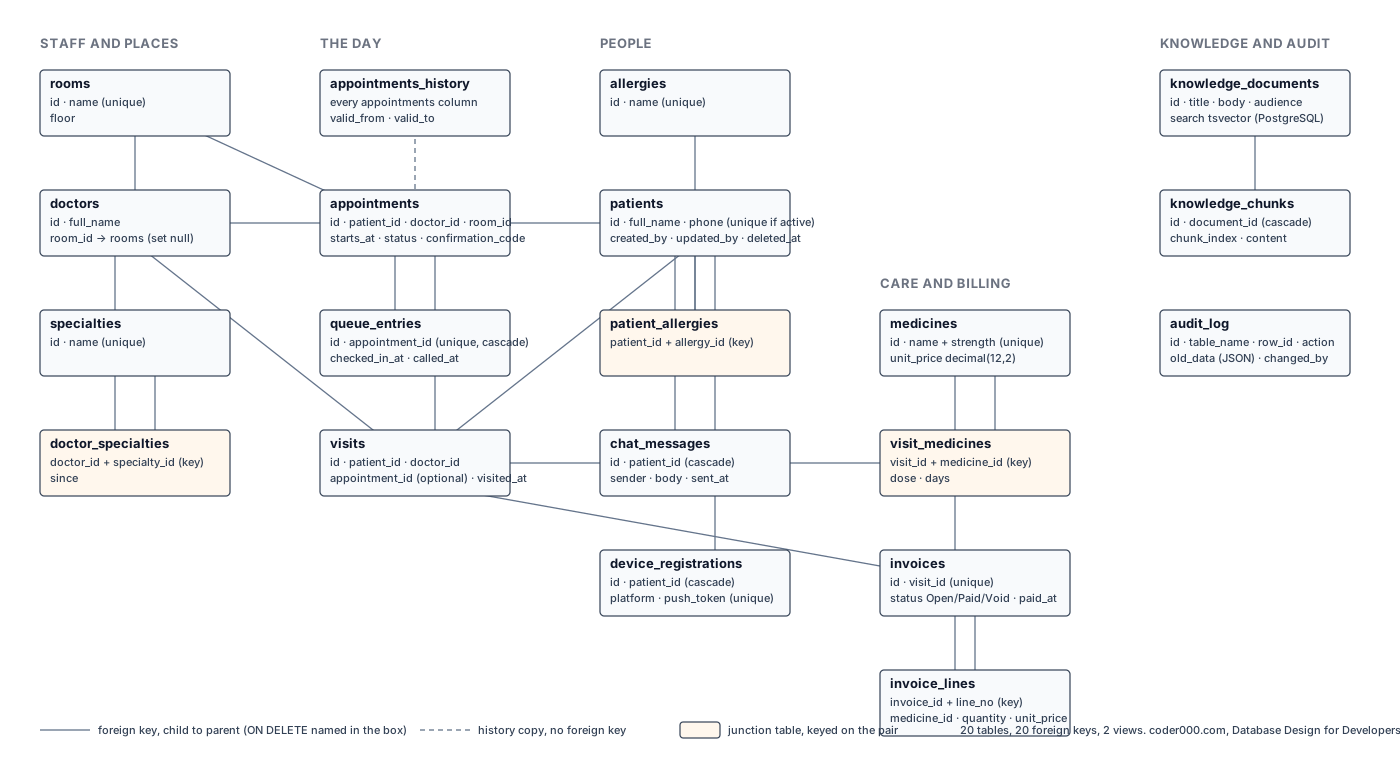
Every table the series built is in one script per engine, and both run clean from an
empty database through a smoke test: a doctor, a room, a patient, an appointment that
goes from Booked to Done and leaves a history row, a queue entry, a visit with a
prescription, and an invoice whose lines total 26.08. Three choices in the finished
version are worth knowing before you adopt it. The one-active-appointment-per-slot rule
became per doctor, UNIQUE (doctor_id, starts_at) filtered to active statuses,
because a clinic with three doctors has three slots at 09:00. A visit's link to its
appointment is optional and unique when present, since walk-ins have none; on SQL Server
that needs a filtered unique index, because a plain unique constraint there admits only
one NULL. And Part 6's rule that an appointment starts after it was created is left out,
because it refuses backdated entries and any imported history. The chat, device and
knowledge tables follow ClinicLive's shape without copying it column for column.
The checklist
- Draw the diagram first. Every entity becomes a table with a primary key, every line a foreign key.
- Use a
bigintidentity as the key. Use a sequential GUID only when ids are made outside the database. Never key on something that can change. - Give every foreign key a deliberate
ON DELETEand an index. - Model many-to-many with a junction table keyed on the pair, and keep the pair unique even when you add an id.
- Money in decimal, moments in UTC, phone numbers as text, ids as
bigint, a short fixed list as a CHECK. - Put the rules the database can guarantee in named constraints, and translate the names in the app.
- Normalise to third normal form. Denormalise only for reports, through views.
- Plural snake_case names and prefixed constraint names, never quoted, the same on both engines.
- Index for the queries you run, equality columns first, and read the plan before and after.
- Soft delete only with a filtered unique index and a view. Keep history in a temporal or history table.
- Change a live schema by expand, backfill in short batches, contract, with a lock timeout.
- Search with a full-text or trigram index, never
LIKE '%...%'on a big table, and report through views.
How this series was made: every script was run on SQL Server 2022 LocalDB and PostgreSQL 18.4 on one machine on 25 September 2026, and every output shown is copied from the transcript of that run. Where an engine behaved differently from what the plan expected, the post says so: PostgreSQL 18's skip scan in Part 9, SQL Server Express rewriting a table for a constant default in Part 11, LocalDB's refusal of full-text search here. Timings are from one laptop and will differ on yours; page counts and plans will not.
Frequently asked
- How do I add search to a SQL database?
- For a starts-with search a normal index is enough. For a contains search or a search box, use the engine's full-text index: tsvector with a GIN index in PostgreSQL, a full-text catalog and CONTAINS in a full SQL Server edition. LIKE with a leading wildcard reads the whole table on both engines; PostgreSQL's pg_trgm extension is the exception that can index it.
- What is the difference between a view, a materialized view and an indexed view?
- A view is a stored query, always current and never stored. A PostgreSQL materialized view stores the result and is stale until refreshed. A SQL Server indexed view stores the result and is maintained on every write, so it is always current, but it must be schema-bound, cannot use outer joins or AVG, and outside Enterprise edition needs the NOEXPAND hint to be read.
- Does SQL Server Express or LocalDB support full-text search?
- LocalDB does not: creating a full-text catalog fails with Msg 9982, Cannot use full-text search in user instance, and FULLTEXTSERVICEPROPERTY reports it as not installed. Full-text search is an optional feature of the full editions; check the edition's feature list before relying on CONTAINS.
This is the end of the series. It began where Conversation to System Design ended, and the clinic it built is the one that gets its private AI assistant in From Prompt to Private. Start again from Part 1 with a schema of your own.