Fatima Al-Sayed sells handmade mugs, bowls, scarves, candles and notebooks online, and keeps every
order in a spreadsheet with one row per order. In September she raised the large candle from 12 to
14, and a July order's total stopped matching what the customer had paid. That one sentence is the
design problem of every shop database, and this post builds the answer from a conversation with
her: thirteen tables on SQL Server and PostgreSQL, an order that keeps the price it was sold at, a
shipment whose status is its history, a review a customer can leave once, six questions a viva
asks answered with real output, and the price mistake reproduced with real numbers before and after
an UPDATE.
- Download the script for your engine: p09-sqlserver.sql or p09-postgresql.sql
- Run it:
sqlcmd -S "(localdb)\MSSQLLocalDB" -I -f 65001 -i p09-sqlserver.sql, orpsql -d postgres -c "CREATE DATABASE sp_p09"thenpsql -d sp_p09 -e -f p09-postgresql.sql - Find the two tables that look alike in section 2,
cart_itemsandorder_items, and the column only one of them has - Read section 3b: Maria Garcia's second review of the mug is refused
- Read 4.6: order 1001's candle cost 12.00 then and 14.00 now, and the order still says 12.00
- Read section 5: the price of the blue mug changes and three old orders change with it, then the repaired totals do not move
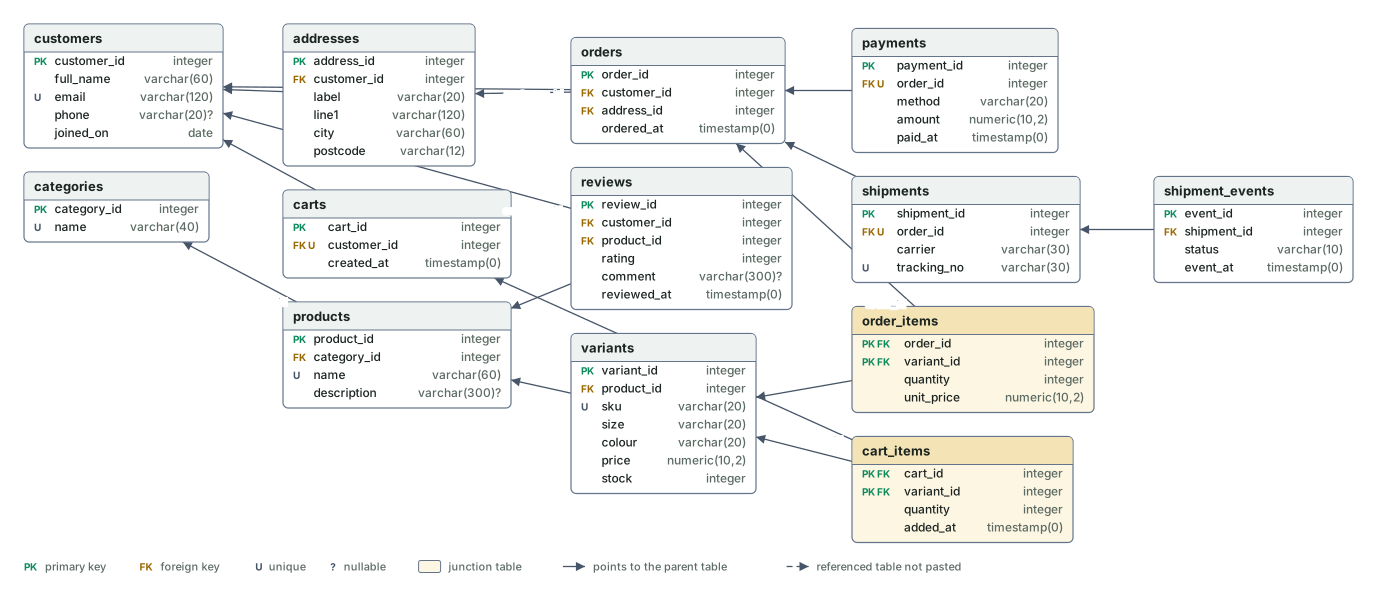
- Paste section 2 into the ER diagram tool and p09-sheet.csv into the normalization checker
The conversation
Fatima: Most products come in versions. The glazed mug comes in 300 ml and 450 ml, in blue or green. Each version has its own price, and I count stock per version, because I can run out of blue while I still have plenty of green. Products sit in categories: ceramics, textiles, candles, paper goods.
Designer: Then what a customer buys is the version, a variant, not the product. The product holds the name and the description; each variant holds its size, colour, price and stock, and a code like MUG-300-BLU. How do customers reach you?
Fatima: They sign up with their email. Many have more than one address; Maria sends some orders home and some to her office. While they browse they put things in a cart, and some carts sit there for days and never become an order. The cart shows today's price; if I change a price, the cart shows the new one.
Designer: So an address is a row of its own, and each order points at the one chosen for it. A cart is not an order: one per customer, lines of variant and quantity, and no price, because it reads the price from the variant until checkout. What happens at checkout?
Fatima: It becomes an order. And here is my problem: I raised the large candle from 12 to 14 in September, and when I looked at a July order the total no longer matched what the customer had paid.
Designer: Because the July order looked its price up in today's list. An order line must keep the price it was sold at: the quantity and the unit price, copied at checkout and never updated afterwards. The total is worked out from the lines, not typed in. How do they pay, and what happens after?
Fatima: Once, by card, wallet or bank transfer, and bank transfers often arrive a day later. Then I pack it, hand it to the national post or a local courier, and it gets delivered. Customers ask where their parcel is, so I want to see when each step happened, not just where it is now.
Designer: One payment per order, so an order with no payment row is not paid yet. One shipment per order with the carrier and tracking number, and one shipment event per change, packed, shipped, delivered, each with its time. The current status is the latest event, so nothing stores it twice. And reviews?
Fatima: After delivery they can leave stars and a comment. Only one per product; someone once tried to post three reviews of the same scarf. And the review is about the product, not the colour.
Designer: A review points at the product, not the variant, with a rating from 1 to 5 and a unique rule on the pair of customer and product, so the database refuses the second one.
From sentences to tables
| Fatima said | Entity | Columns |
|---|---|---|
| sign up with their email; more than one address | customers, addresses | email unique; an address has a customer_id, a label, line1, city, postcode |
| categories; the mug in 300 ml and 450 ml, blue or green, each with its own price and stock | categories, products, variants | a variant's sku, size, colour, price, stock; the triple product, size, colour is unique |
| a cart, which shows today's price | carts, cart_items | one cart per customer; a line is variant_id and quantity, with no price column |
| at checkout it becomes an order; the address chosen for it | orders, order_items | customer_id, address_id, ordered_at; a line is variant_id, quantity, unit_price |
| they pay once | payments | one per order: method, amount, paid_at |
| packed, handed to a courier, delivered; when each step happened | shipments, shipment_events | carrier, tracking_no; an event is a status and an event_at, unique per shipment and status |
| stars and a comment, once per product | reviews | customer_id, product_id, rating 1 to 5, comment; the pair is unique |
| the total; where the parcel is now | nothing | the sum of the lines; the latest event |
Two tables that look alike
A cart line and an order line hold the same three things, a variant, a quantity and who it belongs to, and differ by one column. The cart line has no price, so it always shows today's. The order line has one, copied at checkout:
CREATE TABLE order_items (
    order_id     integer NOT NULL
        CONSTRAINT fk_order_items_orders REFERENCES orders (order_id),
    variant_id   integer NOT NULL
        CONSTRAINT fk_order_items_variants REFERENCES variants (variant_id),
    quantity     integer NOT NULL CONSTRAINT ck_order_items_quantity CHECK (quantity > 0),
    unit_price   numeric(10,2) NOT NULL CONSTRAINT ck_order_items_unit_price CHECK (unit_price >= 0),
    CONSTRAINT pk_order_items PRIMARY KEY (order_id, variant_id)
);
Section 3a shows the copy happening: Arjun Mehta's cart becomes order 1012, and its two lines carry the variant prices of that moment, 9.50 and 32.00, after which the cart is emptied. The variant itself is where the shop's current price and stock live, with the rule that a product has one variant per size and colour:
CREATE TABLE variants (
    variant_id   integer GENERATED ALWAYS AS IDENTITY CONSTRAINT pk_variants PRIMARY KEY,
    product_id   integer NOT NULL
        CONSTRAINT fk_variants_products REFERENCES products (product_id),
    sku          varchar(20) NOT NULL CONSTRAINT uq_variants_sku UNIQUE,
    size         varchar(20) NOT NULL,
    colour       varchar(20) NOT NULL,
    price        numeric(10,2) NOT NULL CONSTRAINT ck_variants_price CHECK (price >= 0),
    stock        integer NOT NULL CONSTRAINT ck_variants_stock CHECK (stock >= 0),
    CONSTRAINT uq_variants_product_size_colour UNIQUE (product_id, size, colour)
);
The review rule is a unique pair, and section 3b tries Maria Garcia's second review of the mug:
ERROR:  duplicate key value violates unique constraint "uq_reviews_customer_product"
DETAIL:  Key (customer_id, product_id)=(1, 1) already exists.
Msg 2627: Violation of UNIQUE KEY constraint 'uq_reviews_customer_product'. Cannot insert duplicate key in object 'dbo.reviews'. The duplicate key value is (1, 1).
The engines differ in spelling only: INT IDENTITY(1001,1) against
GENERATED ALWAYS AS IDENTITY (START WITH 1001) for order numbers that start at 1001,
NVARCHAR against varchar, DECIMAL(10,2) against
numeric(10,2), TOP 5 against LIMIT 5, and
CONVERT(CHAR(7), ordered_at, 126) against to_char(ordered_at, 'YYYY-MM')
for the month label.
The ER diagram
Six questions the examiner asks
The sample holds ten customers, eight products in fourteen variants, twelve orders and twenty-seven order lines. Maria Garcia's order history, with the total summed from the lines and the status taken from the latest shipment event:
 order_id | ordered_on | items | total | latest_status
----------+------------+-------+-------+---------------
     1001 | 2026-07-04 |     4 | 77.00 | delivered
     1003 | 2026-08-03 |     3 | 45.50 | delivered
     1007 | 2026-09-14 |     5 | 75.00 | delivered
     1011 | 2026-10-10 |     3 | 44.00 | packed
(4 rows)
The best-selling variants, by units over every order placed:
     sku      |       product       |  size  | colour | units_sold | revenue
--------------+---------------------+--------+--------+------------+---------
 CANDLE-S-IVR | Soy candle          | Small  | Ivory  |          7 |   63.00
 CANDLE-L-IVR | Soy candle          | Large  | Ivory  |          6 |   78.00
 MUG-300-BLU  | Glazed mug          | 300 ml | Blue   |          6 |  108.00
 NOTE-A5-KFT  | Hand-bound notebook | A5     | Kraft  |          6 |   57.00
 MUG-300-GRN  | Glazed mug          | 300 ml | Green  |          4 |   72.00
(5 rows)
Revenue per month, paid orders only, which is why order 1012 with no payment row is not in October:
  month  | orders | revenue
---------+--------+---------
 2026-07 |      2 |  104.50
 2026-08 |      3 |  171.50
 2026-09 |      3 |  225.00
 2026-10 |      3 |  161.00
(4 rows)
Orders paid but not shipped on 16 October, with how long the customer has waited:
 order_id |   customer   |       paid_at       | days_waiting | latest_status
----------+--------------+---------------------+--------------+---------------
     1009 | Aisha Khan   | 2026-10-06 09:30:00 |           10 | packed
     1010 | Omar Haddad  | 2026-10-08 16:31:00 |            8 | not packed
     1011 | Maria Garcia | 2026-10-10 10:06:00 |            6 | packed
(3 rows)
The average rating per product, with the two products nobody has reviewed kept in the list:
       product       | reviews | avg_rating
---------------------+---------+------------
 Glazed mug          |       3 |       4.00
 Soy candle          |       3 |       3.67
 Hand-woven scarf    |       2 |       4.50
 Beeswax taper pair  |       1 |       5.00
 Stoneware bowl      |       1 |       5.00
 Cotton tote bag     |       1 |       3.00
 Greeting card set   |       0 |
 Hand-bound notebook |       0 |
(8 rows)
One trap on the SQL Server side: the average of an integer column is an integer there, so the script multiplies by 1.0 first; without that, 4.50 prints as 4. And Fatima's own question, order 1001 line by line, the price then against the price now:
     sku      |     product      | quantity | price_then | price_now | price_change
--------------+------------------+----------+------------+-----------+--------------
 CANDLE-L-IVR | Soy candle       |        2 |      12.00 |     14.00 |         2.00
 MUG-300-BLU  | Glazed mug       |        1 |      18.00 |     18.00 |         0.00
 SCARF-RED    | Hand-woven scarf |        1 |      35.00 |     32.00 |        -3.00
(3 rows)
The mistake, with numbers
Section 5 builds order_items_without_price, the same twenty-seven lines without the
price column, and totals Maria's orders by joining to the variant's current price, next to what
she actually paid:
 order_id | total_from_current_price | amount_paid
----------+--------------------------+-------------
     1001 |                    78.00 |       77.00
     1003 |                    45.50 |       45.50
     1007 |                    75.00 |       75.00
     1011 |                    44.00 |       44.00
(4 rows)
Order 1001 is already wrong before anything happens, by exactly the candle's rise and the scarf's cut since July. Then the shop raises the blue mug:
UPDATE variants SET price = 22.00 WHERE sku = 'MUG-300-BLU';
UPDATE 1
order_id | total_from_current_price | amount_paid
----------+--------------------------+-------------
1001 | 82.00 | 77.00
1003 | 53.50 | 45.50
1007 | 75.00 | 75.00
1011 | 48.00 | 44.00
(4 rows)Three of four past orders changed; order 1007 stayed because it has no mug. The repaired query reads the price from the order line, and its answer was the same before and after:
SELECT o.order_id,
       sum(oi.quantity * oi.unit_price)  AS total_from_order_items,
       pay.amount                        AS amount_paid
FROM orders AS o
JOIN customers AS c ON c.customer_id = o.customer_id
JOIN order_items AS oi ON oi.order_id = o.order_id
JOIN payments AS pay ON pay.order_id = o.order_id
WHERE c.email = 'maria.garcia@mail.test'
GROUP BY o.order_id, pay.amount
ORDER BY o.order_id;
 order_id | total_from_order_items | amount_paid
----------+------------------------+-------------
     1001 |                  77.00 |       77.00
     1003 |                  45.50 |       45.50
     1007 |                  75.00 |       75.00
     1011 |                  44.00 |       44.00
(4 rows)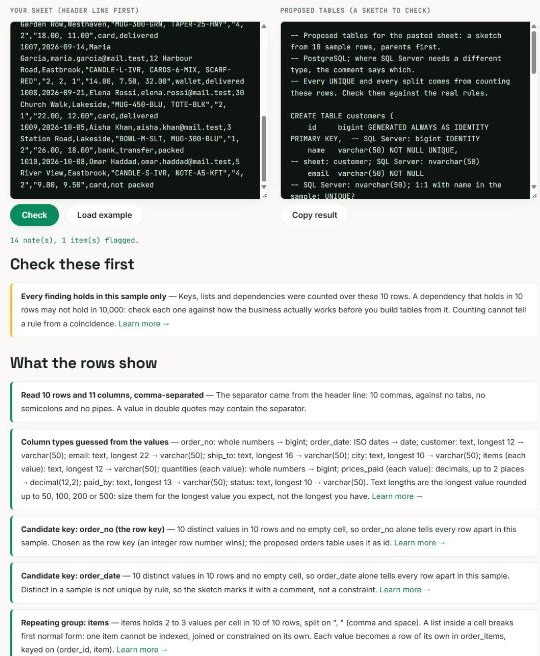
What this design does not do
Four rules are stated in the conversation and left to the application: that an order's address belongs to the ordering customer, that a reviewer bought the product, that the payment equals the order total, and that checkout reduces stock. None is enforced or tested by the scripts. And one thing the design gets only half right: an order points at an address row, so editing that address in place would move old orders too, which is the price mistake in another shape. The next step would be to copy the address into the order the way the price is copied.
The three habits this project teaches: a cart is not an order; an order keeps the price it was sold at; and a status that changes over time is a table of events, with the current one read from the top.
Frequently asked
- What tables does an online shopping database need?
- Thirteen in this design: customers, addresses, categories, products, variants (size, colour, price and stock per version), carts and cart_items (no price column), orders and order_items (with the unit price copied at checkout), payments (one per order), shipments and shipment_events (one row per status change, the latest one is the current status) and reviews (unique per customer and product). Totals are summed from the lines.
- Why should an order store the product price instead of joining to the product?
- Because prices change and orders must not. In this post's run, totalling old orders through the current variant price was already wrong for a July order after a September price rise, and a single UPDATE of one mug's price changed three of four past orders. With unit_price copied into order_items at checkout, the totals matched the payments before and after the change.
- How do you allow only one review per customer per product?
- With a unique constraint on the pair: CONSTRAINT uq_reviews_customer_product UNIQUE (customer_id, product_id) in the reviews table, plus a CHECK that the rating is between 1 and 5. Both SQL Server and PostgreSQL refuse the second review with an error that names the constraint, and the review points at the product rather than the variant because the opinion is about the mug, not its colour.
That closes the series. The same questions, taken further, are the Database Design for Developers series: keys, constraints, normalization with a real repair, indexes and migrations on the same two engines.