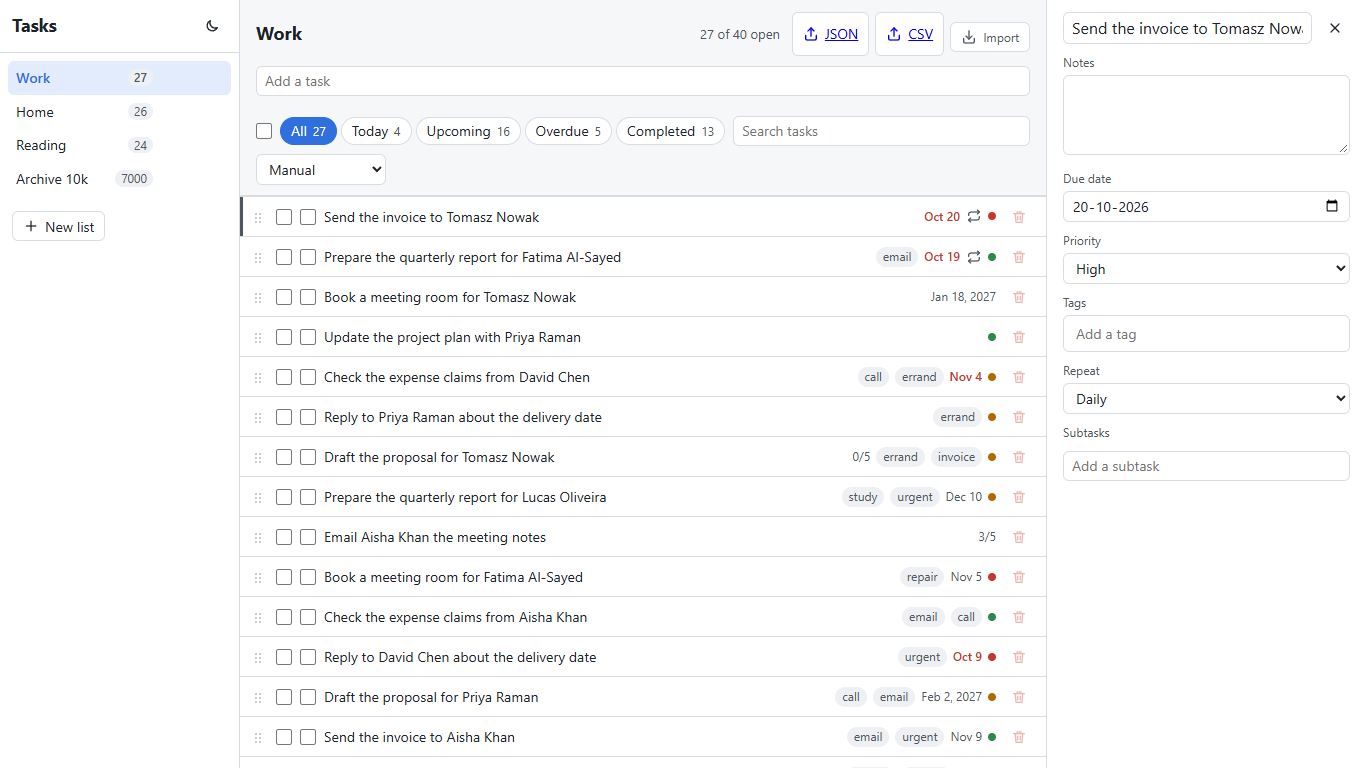
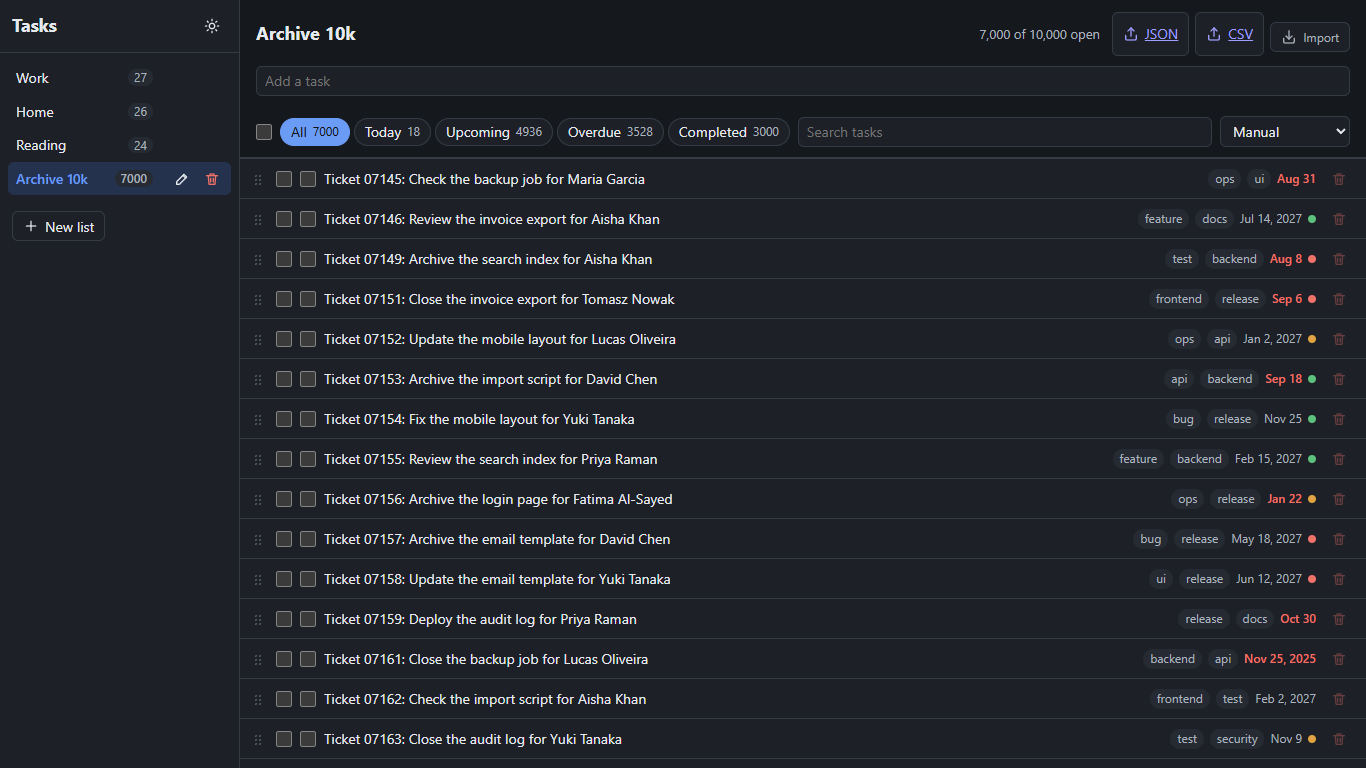
React was the client the AI found easiest, and the numbers say so: fifteen steps in 38 minutes of wall time, 319 turns, $8.86 on the meter, one dependency added, and two failed verdicts that turned out to be the test suite's timing, not React's. It also made a choice no human team would make on purpose. Almost the whole app lives in one file. This part walks the fifteen sessions, quotes what the model said when things went wrong, and says what that means if you let an assistant build your React app.
- Read CLAUDE-react.md.txt, the only instructions the sessions had besides the spec
- Open sessions.csv and filter the client column to react: 17 rows, one per session
- Clone the public repository and open
clients/react;git log --onelineshows one commit per step - Check out the step 13 commit and run step 14 yourself with the command at the end
- Compare the turns and meter of your run with the row in the table below
- Read
ReactClient/src/App.tsxand decide whether you would ship it
The fifteen sessions
Every session started from the same prompt and the same CLAUDE.md (Part 1 has both), on the official Vite scaffold with the React 19 TypeScript template, strict mode and the template's linter, Oxlint, left on. The verdict column is the harness's own run of the frozen suite after the session ended, not the session's claim.
| Step | Turns | Meter | Wall | Verdict |
|---|---|---|---|---|
| 0 Shell | 31 | $0.98 | 221 s | pass |
| 1 Lists | 13 | $0.45 | 88 s | pass |
| 2 Tasks | 15 | $0.44 | 101 s | pass |
| 3 Detail panel | 26 | $0.81 | 187 s | pass |
| 4 Filters | 17 | $0.45 | 83 s | fail, then pass with no change |
| 5 Search and sort | 16 | $0.44 | 87 s | fail, then pass with no change |
| 6 Drag-and-drop reorder | 19 | $0.54 | 113 s | pass |
| 7 Subtasks | 28 | $0.74 | 368 s | pass |
| 8 Bulk actions | 24 | $0.66 | 137 s | pass |
| 9 Undo | 23 | $0.60 | 141 s | pass |
| 10 Keyboard shortcuts | 23 | $0.78 | 204 s | pass |
| 11 Dark mode | 19 | $0.39 | 112 s | pass |
| 12 Import and export | 25 | $0.48 | 127 s | pass |
| 13 Recurring tasks | 16 | $0.54 | 118 s | pass |
| 14 The 10,000-item list | 24 | $0.58 | 167 s | pass |
Thirteen first-time passes, no hand fix, 61 of 61 at the end. The two failures at steps 4 and 5 were the same test both times, step 2's checkbox test, and both retry sessions ran it again, watched it pass, and changed nothing. The next section says why it failed.
What the AI chose
One library in fifteen steps: react-router 8.5.1, added in step 0 for the
three routes. Everything else is hand-written. Drag-and-drop uses the browser's own
drag events with the half-row rule from the spec. The undo toast is a timer and a
piece of state. The 10,000-row list is a virtualization the model wrote itself in step
14, in its words: "I wrote it myself instead of using a library." Rows are 40 pixels,
so the scroll position gives the window; it renders the visible rows plus ten above and
below inside the shared spacer element, and the first row appeared 226 milliseconds
after the click against a budget of fifteen seconds. A human team would reach for
TanStack Virtual; the model reached for arithmetic, and the suite could not tell the
difference.
The choice that matters more is structural. From step 3 on, the summaries say the same
thing in different words: the only file touched was App.tsx. The API
client sits in api.ts, the router in a small file of its own, and the
whole application, sidebar, rows, panel, filters, search, bulk bar, toast, shortcuts,
theme and virtualization, grew in one component file. Nothing in the spec forbids it,
every test passes, and it is exactly the shape a reviewer would send back. The results
post counts the lines; this is the place to say that a prompt which does not ask for
structure does not get it.
What the AI got wrong: nothing that the suite caught twice. The interesting mistake is one it made in step 2 and found in step 7. Toggling a task waited for the server before updating the row, and in the All view a completed row disappears. The suite's checkbox test could find the row and then lose it a few milliseconds later: "The row disappeared at the same moment the API reported the task as completed." That is why two verdicts failed on an earlier step's test. In step 7 the model saw the failure in its own full run, read the failure snapshot and fixed the cause: "I made ticking a task's checkbox update the screen immediately, before the server replies, and put it back if the request fails." It did not fail again. The retry session of step 5, two sessions earlier, had looked at the same test and given up honestly: "It looks intermittent rather than a regression, but I don't know the cause." Same model, same code, different session; the second one had a screenshot. The other recurring friction was the harness, not React: 27 denied shell commands across the run, mostly a copy-and-delete chain and a redirect, each costing a turn. Forty-five minutes of using all four builds by hand found a bug in each of the other three and none in React.
Four details worth copying
The theme script in the head. Step 11 put a few lines of inline script
before the app loads so that data-theme is set from localStorage or the
system preference before the first paint; there is no flash of the wrong theme. Angular's
build left that out and admitted it, which Part 4 quotes.
Search without a debounce, on purpose. The spec asks for a filter on every keystroke and a code comment saying why, because the comparison measures rendering. The session wrote both and replaced the history entry instead of adding one per keystroke, so the back button is not ruined by typing.
Exports as plain links. The export buttons are anchors to the API's
export endpoint; the API's Content-Disposition header does the download
with the right file name. No blob, no object URL, no JavaScript.
Keyboard highlight by position. Once rows were virtualized, j and k could no longer scroll to a row element that might not exist; step 14 changed the highlight to scroll the container by row index. The model noticed the consequence of its own virtualization without being told.
What it tells you about building React with an assistant
The framework got out of the way. There is no React-specific trap in seventeen transcripts: no stale closure, no effect loop, no key warning that cost a turn. The work was the spec, and the model's reading of it was good enough to pass 61 tests with no human in the loop. What the run did not produce is a codebase. If you use an assistant this way, put the structure in the instructions: one component per area, a state module, a limit on file length. The CLAUDE.md here says none of that, because the comparison needed the same rules for four frameworks, and the result shows what the default looks like.
The meter: 17 sessions, 319 turns, $8.86 at list price for the
fifteen steps, plus $0.23 for the two retry sessions that changed nothing. The meter
is Claude Code's own total_cost_usd; on a Max plan it is a measure, not
a bill. Every row is in sessions.csv.
Checkpoint: clients/react in
the repository,
commits "step 00: Shell" to "step 14: The 10,000-item list", exactly as the sessions
left them, with the two empty retry commits in between.
Do it yourself
Run the last step again with the published prompt and compare your transcript with the row above.
- Clone the repository, start the API on React's port and check out the step 13 commit of
clients/react:dotnet run --project api -- --urls http://localhost:16030 --db run/react.db - Install the client and the suite once:
npm --prefix ReactClient install, thennpm installine2e, and copy.env.client.exampleto.env.client. - Sign in to Claude Code and run step 14 from the repository root:
powershell -NoProfile -ExecutionPolicy Bypass -File harness/run-step.ps1 -Client react -Step 14 -Run 1 -RunClaude harness/run-claude.ps1 - Read the session's summary at the end of the transcript the runner saved, and its line in
sessions.jsonl. - Run the frozen suite yourself:
npx playwright testine2e. - Open
src/App.tsxat the new commit and look for the virtualization; then decide what you would have asked for differently.
What you should see: a verdict of 61 passed, a turn count in the twenties, and a diff that touches one or two files.
Frequently asked
- Which libraries did Claude Code add to the React app?
- One: react-router 8.5.1 in step 0. Drag-and-drop, the undo toast, keyboard shortcuts, dark mode and the 10,000-row virtualization were all written by hand in the sessions, and the frozen suite passed every one of them.
- Why did two React sessions fail their first verdict?
- Both failures were step 2's checkbox test, which could lose a row the moment the server marked it completed. The retry sessions changed nothing and the test passed; step 7 later found the race and made the checkbox update the row before the server replied. The results post counts these as verdict flakes, not React failures.
- Is the React code good enough to ship?
- It passes 61 end-to-end tests and compiles under strict TypeScript, but nearly the whole app lives in App.tsx because nothing in the shared instructions asked for structure. Ask for it in your CLAUDE.md; the same prompt that builds a working app does not build a maintainable one on its own.
Next: Part 4, the Angular build: the same steps, more turns, a Node version refusal, and one real bug the retry found. The numbers for all four are in Part 5.