"What computer do we need?" is the first question a clinic owner asks and the one most tutorials answer with a shrug and a link to a graphics card. This part answers it with arithmetic you can do on a napkin and measurements you can repeat: how much memory a model needs, what happens when the server has no GPU at all, what happens when four receptionists ask at once, and how many watts the answer costs. Two of the first measurements were wrong, and the reasons are more useful than the numbers.
The arithmetic
A model's weight file at four-bit quantization is about 0.6 GB per billion parameters. That single rule gets you most of the way: 3B is 2 GB, 8B is 4.9, 12B is 8.1, 14B is 9.0, 32B is about 20, 70B is about 43. The file has to sit in memory that the processor can reach fast: video memory on a GPU, system RAM on a CPU-only box. On top of the file comes the working memory of each conversation, the key-value cache, which grows with context length and is paid once per simultaneous request. At a 4,096-token context it was about half a gigabyte per slot for the 14B model: 9.0 GB on disk, 9.5 GB resident, 11 GB with four slots open.
So the sizing question has three inputs: which model, how many people at once, and whether a GPU is on the table. Everything below is those three inputs measured.
No GPU: the minimum server, honestly
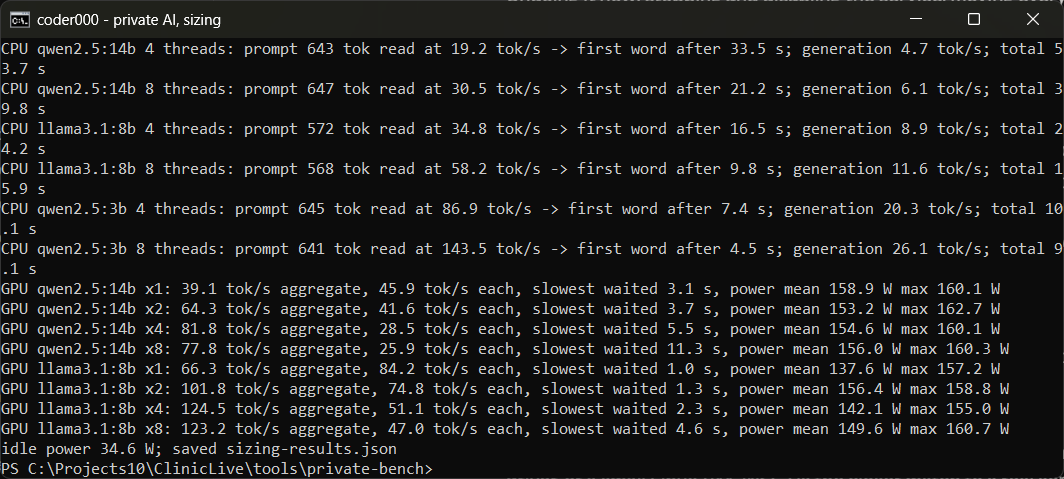
A clinic that already owns a small server will ask whether it can skip the graphics card. It can, with a catch that generation speed hides. The test is a realistic question: the full clinic sheet plus the question, about 640 tokens, the shape every grounded answer in Parts 6 and 7 will have. The laptop's GPU was disabled and Ollama was limited to four, then eight, CPU threads.
| Model | Threads | Reads the prompt at | First word after | Then writes at | Whole answer |
|---|---|---|---|---|---|
| Qwen 2.5 14B | 4 | 19 tok/s | 33.5 s | 4.7 tok/s | 54 s |
| Qwen 2.5 14B | 8 | 30 tok/s | 21.2 s | 6.1 tok/s | 40 s |
| Llama 3.1 8B | 4 | 35 tok/s | 16.5 s | 8.9 tok/s | 24 s |
| Llama 3.1 8B | 8 | 58 tok/s | 9.8 s | 11.6 tok/s | 16 s |
| Qwen 2.5 3B | 4 | 87 tok/s | 7.4 s | 20 tok/s | 10 s |
| Qwen 2.5 3B | 8 | 144 tok/s | 4.5 s | 26 tok/s | 9 s |
Read the "first word after" column, not the writing speed. A receptionist who asks the 14B model a question on a four-core box waits half a minute in silence before anything appears, because the CPU reads the prompt at nineteen tokens a second and the prompt is six hundred tokens long. Writing speed is fine once it starts; the wait is the problem, and it grows with every document you attach. The 8B model halves the wait, the 3B model makes it tolerable, and both give up accuracy the exam in Part 2 measured. So the minimum server is real but narrow: eight cores, 16 GB of RAM, the 3B or 8B model, one user at a time, and a clinic that accepts a pause of several seconds per question.
The first version of this table said the CPU read prompts at 2,700 tokens a second, which would have made the whole section unnecessary. It was a cache hit: the warm-up call had already processed the identical prompt and Ollama reused it. The fix was a unique prefix on every request. If a local-model benchmark quotes prompt speeds in the thousands on a CPU, ask how many times it sent the same prompt.
With a GPU: four users is the knee
The desired server has a 16 GB card. The question there is not speed but crowding: what happens when two, four or eight staff members ask at the same moment. Ollama serves one request at a time unless told otherwise, and the first run of this test proved it: eight simultaneous questions produced the same 42 tokens a second in total as one, and the last person waited 23 seconds. With four parallel slots configured, the picture changes:
| Model | At once | Total output | Each user sees | Slowest answer | Power |
|---|---|---|---|---|---|
| Qwen 2.5 14B | 1 | 39 tok/s | 46 tok/s | 3.1 s | 159 W |
| Qwen 2.5 14B | 2 | 64 tok/s | 42 tok/s | 3.7 s | 153 W |
| Qwen 2.5 14B | 4 | 82 tok/s | 28 tok/s | 5.5 s | 155 W |
| Qwen 2.5 14B | 8 | 78 tok/s | 26 tok/s | 11.3 s | 156 W |
| Llama 3.1 8B | 1 | 66 tok/s | 84 tok/s | 1.0 s | 138 W |
| Llama 3.1 8B | 4 | 125 tok/s | 51 tok/s | 2.3 s | 142 W |
| Llama 3.1 8B | 8 | 123 tok/s | 47 tok/s | 4.6 s | 150 W |
Total output doubles from one user to four and then stops growing: the eighth user does not add throughput, they queue behind the fourth. Each user still sees 26 tokens a second on the 14B model at four at once, which is faster than reading. For a clinic with a front desk of two to four people, a single 16 GB card with four slots is not a compromise; it is the right size. Note what the parallel setting costs: each slot carries its own working memory, so four slots on the 14B model need about 11 GB resident, still inside 16 GB.
What it costs to run
The card idles at about 35 W and draws 140 to 160 W while answering, so an answer costs roughly 120 W above idle for the seconds it takes. A busy day of five hundred staff questions at five seconds each is forty minutes of generation: about 0.08 kWh, a few rupees or cents. The idle draw over a month matters more than the answers, and it is the number Part 11 puts against an API bill. The point for sizing is that power is not the constraint; memory is.
Buy or rent: the table for a clinic
| Option | Runs | Users at once | Verdict |
|---|---|---|---|
| Existing 8-core server, 16 GB RAM, no GPU | 3B, 8B slowly | 1 | Minimum. Pilot only. |
| Desktop with a used 12 GB card (3060 class) | 8B, 12B; 14B tightly | 2 to 3 | Cheapest real deployment. |
| Desktop or small server with a 16 GB card | 14B with four slots | 4 | Recommended. This series. |
| Apple Silicon with 32 GB or more unified memory | 14B comfortably, 32B | 2 to 4 | Quiet and small; check Ollama's Metal support for your model. |
| Rented GPU by the hour | Anything | Any | Only for the evaluation in Part 10. Patient data must not go there. |
Renting is the line to be careful with. A rented GPU is someone else's computer; sending it the clinic's documents defeats the reason this season exists. It is fine for benchmarking a model on the fictional sheet, and for nothing else.
Do it yourself
The two measurements that decide the purchase, and the two traps that make them lie.
- Start with the arithmetic before any run: at four-bit quantization a model file is about 0.6 GB per billion parameters, plus roughly 0.5 GB of working memory per simultaneous conversation at a 4k context. A 14B model with four slots wants about 11 GB; that is the number to hold against your card.
- Force the CPU path to measure the no-GPU case. Two options on the request do it; the thread count is the one your server will actually have:
"options": {"num_gpu": 0, "num_thread": 4} - Defeat the prompt cache, or the reading speed you measure will be a cache hit. The script prefixes every request with a unique line:
body = {"model": model, "prompt": f"[request {uuid.uuid4()}]\n" + PROMPT, ...} - Allow parallel requests before measuring concurrency; the default serves one at a time and eight users simply queue. Linux, in the drop-in from Part 4:
OLLAMA_NUM_PARALLEL=4. Windows, run the server by hand with the variable set:setx OLLAMA_NUM_PARALLEL 4 # then in a new shell: ollama serve - Sample power while it answers; the delta over idle is the running-cost number:
nvidia-smi --query-gpu=power.draw --format=csv,noheader,nounits - Run the season's script and read the "first word after" column for CPU and the "slowest answer" column for the GPU:
cd tools/private-bench
python sizing.py qwen2.5:14b llama3.1:8b qwen2.5:3b
What you should see: on CPU, a first word that takes tens of seconds and a generation speed that looks fine; on the GPU, total output that doubles from one user to four and stops. If the CPU reads prompts in the thousands of tokens a second, the cache is still on.
The brief that built it, trimmed to the lines that decided the result. Season one put every prompt in a commit message; this season's briefs were written to a coding assistant before each part, and this is what they said.
Write sizing.py: with the GPU disabled measure prompt-reading and generation speed at 4 and 8 threads for the
14B, 8B and 3B models on a realistic 640-token grounded prompt; then with the GPU measure 1, 2, 4 and 8
simultaneous requests (aggregate tok/s, per-request speed, slowest wait) while sampling nvidia-smi power;
give every request a unique prefix so the prompt cache cannot fake the reading speed.
Perishable facts, as of September 2026: the CPU rows are a laptop's CPU limited to four or eight threads, not a server chip; a real four-core cloud VM will be somewhat slower still. The GPU is an RTX 3080 Ti Laptop with 16 GB. Ollama 0.34.2; its default is one request at a time, changed with OLLAMA_NUM_PARALLEL. The 0.6 GB per billion parameters rule holds for Q4_K_M and changes with other quantizations.
Model pick: high effort for this part, because a wrong sizing table sends someone shopping. The measurement script itself is small; the judgment is in what to measure, and the two corrections above were caught by reading the numbers, not by the script.
What the AI got wrong: the first sizing script measured a cache, not a CPU, and its concurrency test measured a queue, not concurrency. Both produced tidy numbers that were nonsense, and both would have gone into this table if the numbers had not been read against common sense. On the tooling side, the Windows tray app ignored the parallel setting after a restart; the server was run by hand for the second attempt, which is how it will run on Linux anyway.
The meter: the running-cost reading starts here: about 120 W above idle while answering, 35 W idle. The build meter for Parts 1 to 3, all measurement and writing, no application code, is folded into Part 5's number, where the first code lands.
Checkpoint: tag private-03 in
the repo holds
tools/private-bench/sizing.py, its results, and
docs/private.md, the season's spec. Run the script on your own machine
with your own models; the "first word after" column is the one to compare. Next: the
server install, done properly.