A local model on a developer's laptop is a demo. A local model on the clinic's server, started by systemd, warmed after every reboot, listening only where the application can reach it and nowhere else, is a system. This part is the install, done the way it should be done for a clinic, and verified with a script that anyone can re-run: service state, the exact address it listens on, a warm-up timing, a smoke answer, and one line that proves the network cannot see the port.
Where this server is
The clinic's server in this series is Ubuntu 24.04 running under WSL2 on the dev machine, with systemd enabled and the same GPU passed through by the NVIDIA driver. It behaves like a Linux box in every way the install cares about: a systemd unit, a system user, a loopback interface, a LAN address, and journal logs. What it is not is the VPS that hosts this site and the ClinicLive demo. That box has no GPU and shares its memory with several sites, so the private assistant does not run there; the live demo stays as it was after season three. Everything in this part transfers to a real Ubuntu server unchanged.
Install, and the first surprise
apt-get install -y zstd
curl -fsSL https://ollama.com/install.sh | sh
The official script installs a binary under /usr/local, creates a system user named ollama, writes a systemd unit and starts it. On a fresh Ubuntu it stopped at once with "This version requires zstd for extraction", a one-line fix the script names itself, and the first of this season's Fixes posts. It then needs root: on a server that is sudo; in WSL the default user prompted for a password the automation could not type, so the install ran as root explicitly.
The four settings, and why each one
The installer's defaults are close to right and one of them is dangerous to leave implicit. A systemd drop-in file pins four environment values on the service:
- OLLAMA_HOST=127.0.0.1:11434. Loopback only. It is the default today, and the drop-in makes it a decision rather than a default, so a future release that binds wider cannot open the port on the clinic's network by surprise. The API has no authentication; the interface is the authentication.
- OLLAMA_KEEP_ALIVE=24h. Part 1 measured cold loads of ten to seventy seconds; the default unloads a model after five idle minutes. A receptionist's first question after lunch must not pay the load.
- OLLAMA_NUM_PARALLEL=2. Part 3 showed four slots is the knee on this card and that each slot costs memory. Two is enough for a front desk and leaves room for the embedding model beside the 14B one.
- OLLAMA_MAX_LOADED_MODELS=2. The chat model and the embedding model must both stay resident; Part 2 saw a 74-second stall when the embedding model had to load while chat models sat on the card.
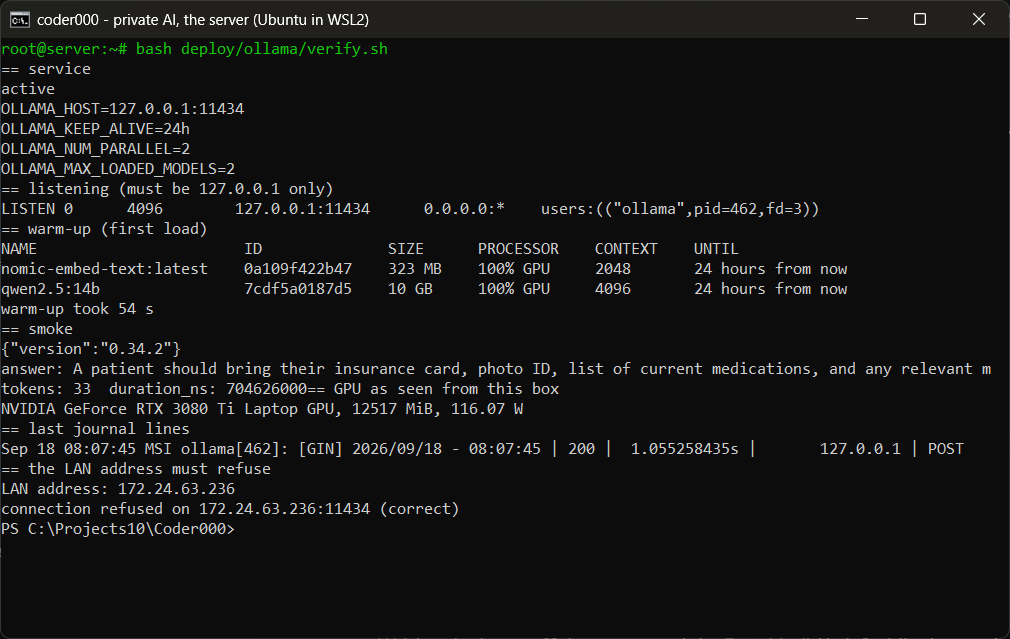
Then a warm-up script that sends one tiny request to each model with a 24-hour keep-alive, so the first real question after a reboot is not the slow one. Run it after every restart, or from a timer if the box reboots unattended. In the verification it took 54 seconds, which is exactly the cost the keep-alive setting saves the clinic every idle afternoon.
Proving the port is closed
The verification script ends by asking the server for its own LAN address and connecting to the runtime's port on it. "Connection refused" is the passing result, and it is worth a line in the script rather than a sentence in a document, because the next person to touch the box will run the script and not read the document. The firewall has nothing to allow and should stay that way; the README says to check that 11434 is absent from the ufw rules, not present.
If the runtime must live on another box
Sometimes the GPU machine is not the machine that runs the application. Only then does the port need to cross a network, and only behind two things: TLS from certbot, exactly as for the website, and a shared key that nginx checks before the request reaches the runtime. The repo carries the nginx pattern: reject any request without the right X-Ai-Key header, proxy to the loopback port, keep the read timeout long for slow answers and turn buffering off so streamed tokens arrive as they are produced. The key lives in the application's server-side configuration, never in the repo. On the same box, none of this is used, and that is the recommended arrangement.
What the smoke test says
Thirty-three tokens in 0.7 seconds, both models on the GPU, 12.5 GB of the card in use with two parallel slots open, 116 W while answering. And the answer itself, insurance card and all, is the same guess Part 5's page produced, now from a properly installed server. The infrastructure is finished; the assistant is still ignorant. Part 6 is where that changes.
Do it yourself
On any Ubuntu 24.04 box with root. Everything below is in deploy/ollama at tag private-04.
- Install, with the one package the installer forgets to mention until it fails:
sudo apt-get install -y zstd curl -fsSL https://ollama.com/install.sh | sh systemctl is-active ollama # active - Pin the four settings in a systemd drop-in, then reload and restart:
# /etc/systemd/system/ollama.service.d/override.conf
[Service]
Environment="OLLAMA_HOST=127.0.0.1:11434"
Environment="OLLAMA_KEEP_ALIVE=24h"
Environment="OLLAMA_NUM_PARALLEL=2"
Environment="OLLAMA_MAX_LOADED_MODELS=2"
sudo systemctl daemon-reload && sudo systemctl restart ollama - Pull the two models the application uses, and warm them so the first question is not the slow one:
ollama pull qwen2.5:14b ollama pull nomic-embed-text bash deploy/ollama/warm.sh # loads both with a 24h keep-alive, then prints ollama ps - Prove the port is closed to the network. Loopback in the listener, refusal on the LAN address:
ss -ltnp | grep 11434 # LISTEN 0 4096 127.0.0.1:11434 0.0.0.0:* users:(("ollama",...)) curl -s -m 3 http://$(ip -4 addr show eth0 | grep -oP 'inet \K[\d.]+'):11434/api/version || echo "connection refused (correct)" - Or run the whole check as one script, which is what the screenshot shows:
sudo bash deploy/ollama/verify.sh - Only if the runtime must live on another machine: put nginx in front with TLS and a shared header key, using
deploy/ollama/nginx-ai-gateway.conf, and keep the key in the application's server-side configuration. On the same box, skip this step and the port never crosses a wire.
What you should see: the four environment values in systemctl show ollama -p Environment, both models at 100% GPU in ollama ps, a smoke answer in under a second, and the last line of the script saying "connection refused" on your LAN address.
The brief that built it, trimmed to the lines that decided the result. Season one put every prompt in a commit message; this season's briefs were written to a coding assistant before each part, and this is what they said.
Add deploy/ollama: a README with install, configure, models, firewall, smoke test and separate-box sections;
a systemd drop-in pinning OLLAMA_HOST to 127.0.0.1:11434, KEEP_ALIVE 24h, NUM_PARALLEL 2 and
MAX_LOADED_MODELS 2; warm.sh to load both models after a restart; an nginx gateway config with TLS and an
X-Ai-Key check for the case where the runtime is on another machine; and verify.sh that applies the override,
warms, smoke-tests and proves the LAN address refuses.
Perishable facts, as of September 2026: Ollama 0.34.2 on Ubuntu 24.04; the zstd requirement appeared with this installer version; the environment variable names are Ollama's current ones. WSL2 needs systemd enabled in wsl.conf for the unit to exist; a real server has it already.
Model pick: the settings and their reasons are judgment, written at high effort from the measurements of Parts 1 to 3; the scripts are short and were written in the same session rather than briefed out.
What the AI got wrong: the first install attempt ran as a user who needed a sudo password and hung silently for twenty minutes; the second failed on the missing zstd. Both were the assistant's automation, not the installer's fault, and both are the kind of stall a clinic's IT contact will hit at 6 pm on a Friday.
The meter: the running-cost reading gains its idle component here: a server that keeps two models warm around the clock draws about 35 W doing nothing, which is the price of never paying the 54-second load. Part 11 turns that into a monthly figure.
Checkpoint: tag private-04 in
the repo holds
deploy/ollama: the README, the drop-in, the warm-up script, the nginx
pattern and verify.sh. Run the script as root on your server; the last
line must say "connection refused". Next: the application talks to it.