Previously, in Part 4, the phone became the third client of the clinic's queue hub, and the big number moves the moment reception taps "Call next". But a number that changes on a screen nobody is looking at has changed for nobody. This part gives the app a way to interrupt — a tap, a buzz, a line in the notification tray — and spends most of its effort deciding when it has earned the right to.
- Prompt for two capabilities:
IHapticswith exactly two verbs, andINotifierwith permission as a separate step - Implement
Hapticsonce with MAUI Essentials (a click forTap, a 400 ms vibration forBuzz) and addVIBRATEto the Android manifest - Write
Notifieras a partial class: Android with a channel,Permissions.PostNotificationsandNotificationCompat; Windows viaAppNotification; iOS and Mac as no-ops - Give the web host
navigator.vibrateand the Notification API over JS interop, registered scoped, not singleton - Make
await Notifier.RequestPermissionAsync()the first line ofCheckInAsync, andTap()on success - Add
NudgeIfItMattersAsync: position becoming 1 earns a tap and "You're next", your turn earns a buzz and "It's your turn" - Check in on the emulator, have reception press Call next twice, then run
adb shell dumpsys vibrator_manager - Compare with tag
pocket-05in the repo
The prompt: two verbs and a moment
Verbatim from the commit in the
repo (tag pocket-05):
"Two more capabilities. IHaptics with exactly two verbs — Tap (that
registered) and Buzz (look at me now) — because an app that vibrates for
everything gets muted. INotifier with permission as a separate step, asked
at check-in where the reason is obvious, never at launch. MAUI: haptics via
MAUI Essentials in one file; notifications as a partial class with the body
per platform — Android with a channel, the Android 13 runtime permission and
NotificationCompat, no plugin; Windows through the App SDK toast API;
iOS/Mac honest no-ops since they aren't built here. Web: navigator.vibrate
and the Notification API over JS interop, registered per circuit. On the
Visit screen only TRANSITIONS earn a nudge: position becomes 1 → tap +
'You're next'; status becomes your turn → buzz + 'It's your turn'. Prove it
on the emulator, and prove the buzzes with the OS's own vibrator log."
Two decisions are made before any code exists. "Exactly two verbs" is a restraint rule — a vocabulary so small it can't be abused. "Permission as a separate step, asked at check-in" is a timing rule — an app that asks on its splash screen is a stranger asking a favor. And the last clause asks for evidence from the operating system's own log, because a screenshot cannot show a vibration.
Model pick: Opus, high effort, for the two-verbs and permission-in-context design — product decisions with a long shelf life. The platform bodies went to Sonnet: a channel, a builder chain, a toast — precisely specified, exactly its shape of work. The most expensive tokens of the part went on something neither model could fix; that story is below.
Two verbs, because muted apps don't buzz
The capability-interface pattern from Part 2 continues: the shared project asks a question, each host answers it. Capability three is the shortest interface of the season, and its comment is the whole argument:
/// Capability #3: physical feedback. Two verbs only — a phone app that vibrates for
/// everything is a phone app people mute.
public interface IHaptics
{
    bool IsSupported { get; }

    /// A light click: "that tap registered".
    void Tap();

    /// An attention buzz: "look at me now" — it's your turn.
    void Buzz();
}
No Vibrate(pattern), no intensity, no duration. A screen that wants a third
feeling has to argue for a third verb in a code review, which is the point. On MAUI, for
once, one file covers every platform, because HapticFeedback and
Vibration are MAUI Essentials:
public sealed class Haptics : IHaptics
{
    public bool IsSupported => HapticFeedback.Default.IsSupported || Vibration.Default.IsSupported;

    public void Tap()
    {
        try
        {
            HapticFeedback.Default.Perform(HapticFeedbackType.Click);
        }
        catch (FeatureNotSupportedException)
        {
            // desktops and some tablets: silently nothing
        }
    }

    public void Buzz()
    {
        /* … Vibration.Default.Vibrate(TimeSpan.FromMilliseconds(400)), same guard … */
    }
}
Android wants VIBRATE in the manifest for the buzz; the click needs nothing.
The browser host answers with navigator.vibrate — 30 ms for a tap, a
200-100-200 pattern for a buzz — which exists on Android Chrome and, as its own comment
says, "nowhere else that matters". Both answers are honest; the shared UI copes with either.
Permission is a separate step — and the step is check-in
/// Asking permission is a separate step on purpose: ask at a moment that explains
/// itself ("we'll tell you when it's your turn"), never at launch.
public interface INotifier
{
    Task<bool> RequestPermissionAsync();

    Task ShowAsync(string title, string body);
}
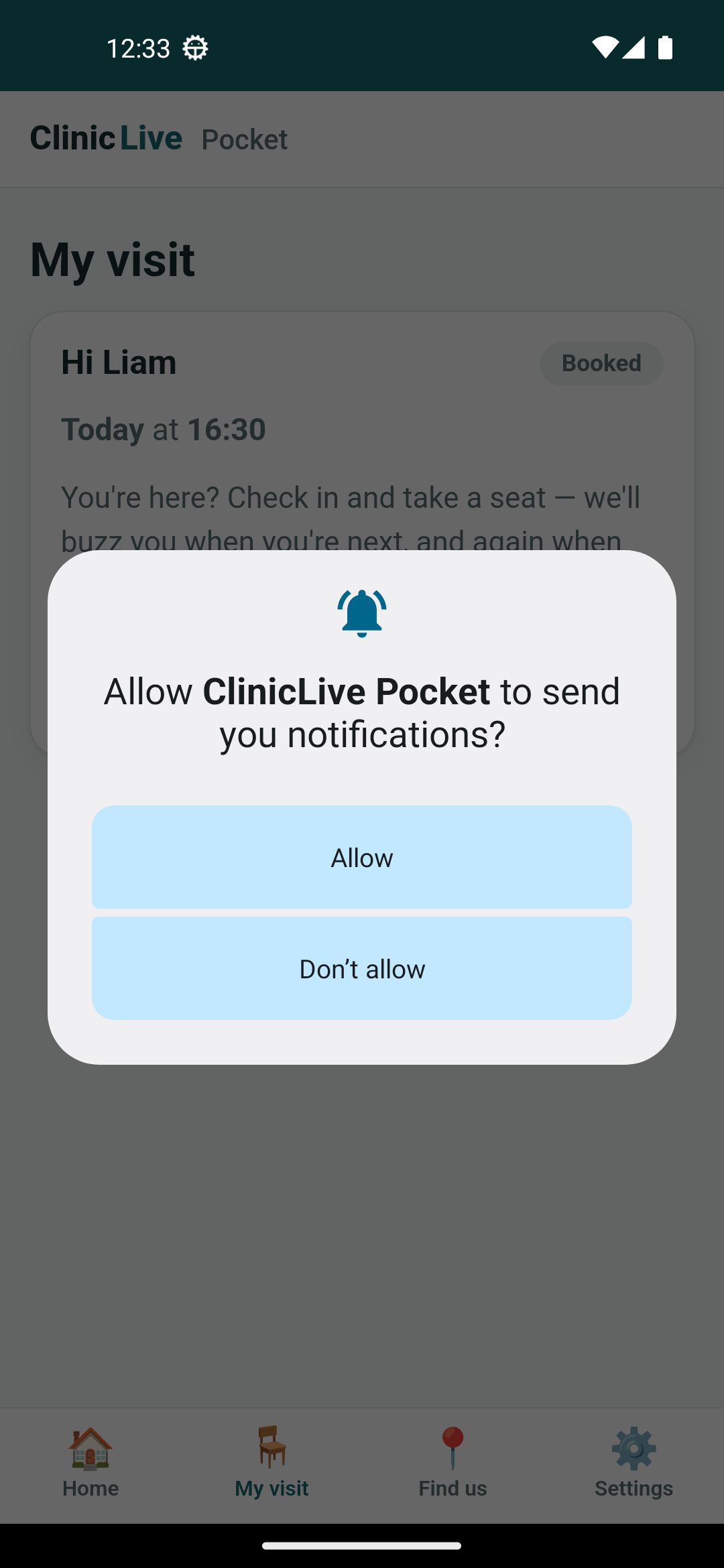
The Visit screen chooses the moment. The sentence above the check-in button already says
"we'll buzz you when you're next, and again when it's your turn", and the first line of
CheckInAsync is await Notifier.RequestPermissionAsync() — the
question arrives right after the promise, when a person is most likely to say yes. A
successful check-in earns a Tap(). Nothing at launch earns anything.
One shape, a body per platform
MAUI has no cross-platform notification API, and the prompt refuses a plugin. The
MAUI-idiomatic answer is a partial class: the shape in Services/, a
body in each folder under Platforms/, and only the file for the platform being
built is compiled.
public sealed partial class Notifier : INotifier
{
    public partial Task<bool> RequestPermissionAsync();

    public partial Task ShowAsync(string title, string body);
}
The Android body is the one worth seeing — a channel (mandatory since 8.0), the
POST_NOTIFICATIONS runtime permission (mandatory since 13; MAUI's
Permissions.PostNotifications does the version check), and
NotificationCompat to build the thing. About forty lines, no package:
public sealed partial class Notifier
{
    public const string ChannelId = "queue";

    public partial async Task<bool> RequestPermissionAsync()
    {
        /* … CheckStatusAsync, then RequestAsync<Permissions.PostNotifications> … */
    }

    public partial Task ShowAsync(string title, string body)
    {
        EnsureChannel();
        /* … NotificationManager, a launch intent so a tap opens the app, the icon by name … */
        var notification = new NotificationCompat.Builder(context, ChannelId)
            .SetSmallIcon(icon)
            .SetContentTitle(title)
            .SetContentText(body)
            .SetPriority(NotificationCompat.PriorityHigh)
            .SetAutoCancel(true)
            .SetContentIntent(tap)
            .Build();

        manager.Notify(Interlocked.Increment(ref _nextId), notification);
        return Task.CompletedTask;
    }
}
Windows is a dozen lines through the Windows App SDK — build an AppNotification,
Show() it — with no permission dialog at all: the user decides in
Settings › Notifications, and Setting == Enabled reports what they chose. iOS
and Mac Catalyst get honest no-ops;
Part 1 said there's no Mac on this
bench, and a no-op that says so beats a body nobody ran. The browser host calls the
Notification API through JS interop, and its registration carries the one detail that
matters on Blazor Server: scoped, not singleton, because IJSRuntime
belongs to one visitor's circuit.
Only transitions earn a nudge
Here is the sentence the whole part hangs on. The Visit screen reloads itself constantly — every hub signal, every resume, every check-in — and most reloads change nothing. If every reload could buzz, the phone would buzz whenever someone else checked in. So the page compares the visit before a load with the visit after it, and only two transitions count:
/// Only TRANSITIONS earn a buzz — never the first load, never a refresh that
/// changed nothing. Two moments matter to someone in a waiting room: "you're
/// next" (get your things together) and "it's your turn" (go now).
private async Task NudgeIfItMattersAsync(VisitDto before, VisitDto after)
{
    if (after.Status == VisitStatus.InProgress && before.Status != VisitStatus.InProgress)
    {
        Haptics.Buzz();
        await Notifier.ShowAsync("It's your turn", $"{after.FirstName}, please go through now.");
    }
    else if (after.Status == VisitStatus.CheckedIn && after.Position == 1 && before.Position != 1)
    {
        Haptics.Tap();
        await Notifier.ShowAsync("You're next", "Get ready — you're first in the queue.");
    }
}
Tap for "next", buzz for "turn" — the two verbs mapped to the two moments, and nothing else
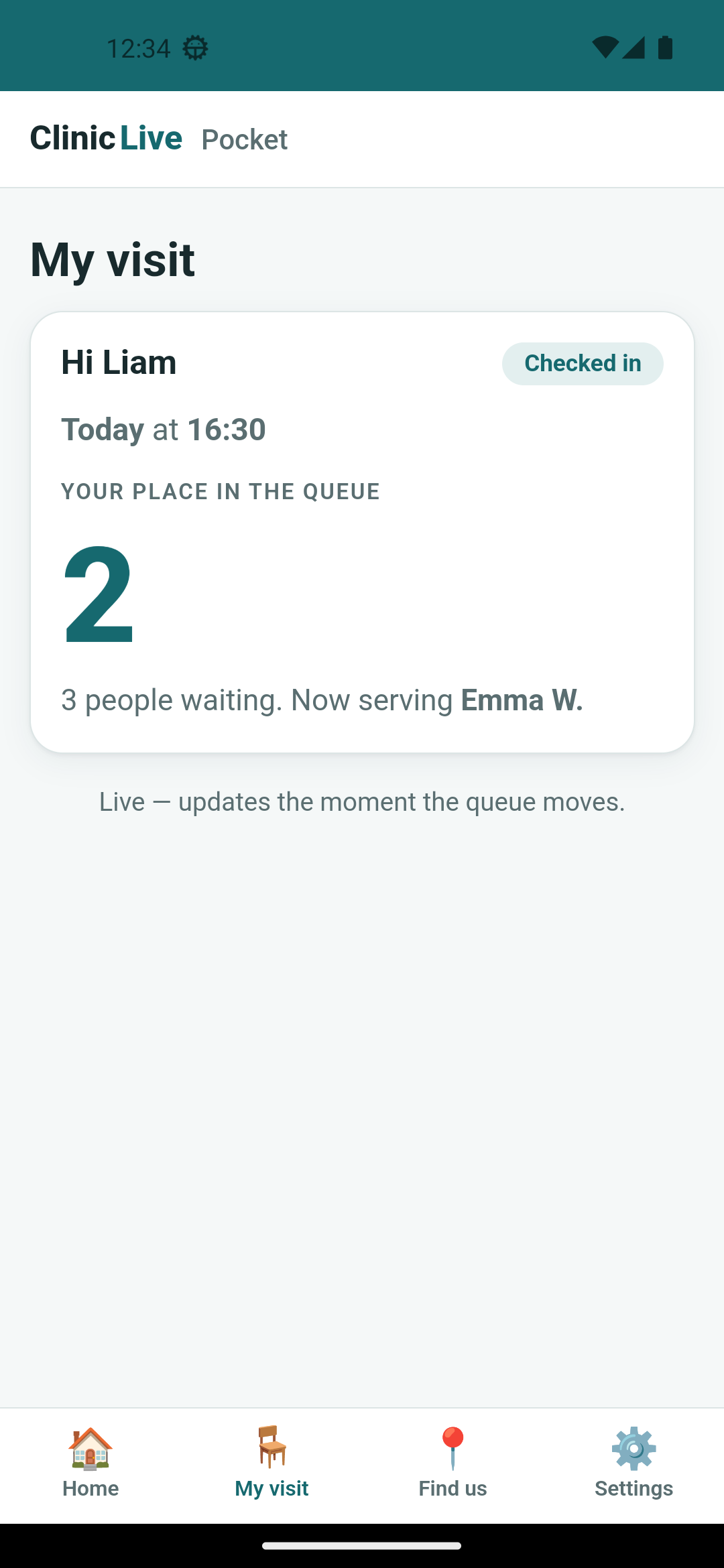
in the app may call either. The demo: Liam (booking VVPYPN, 16:30) allows
notifications and lands at position 2 of three waiting — ahead of Sofia, who checked in
first but holds the 16:45 slot. That's season one's queue rule, slot time first, now
visible from a phone. Then reception taps "Call next" twice.
 Allowed, checked in
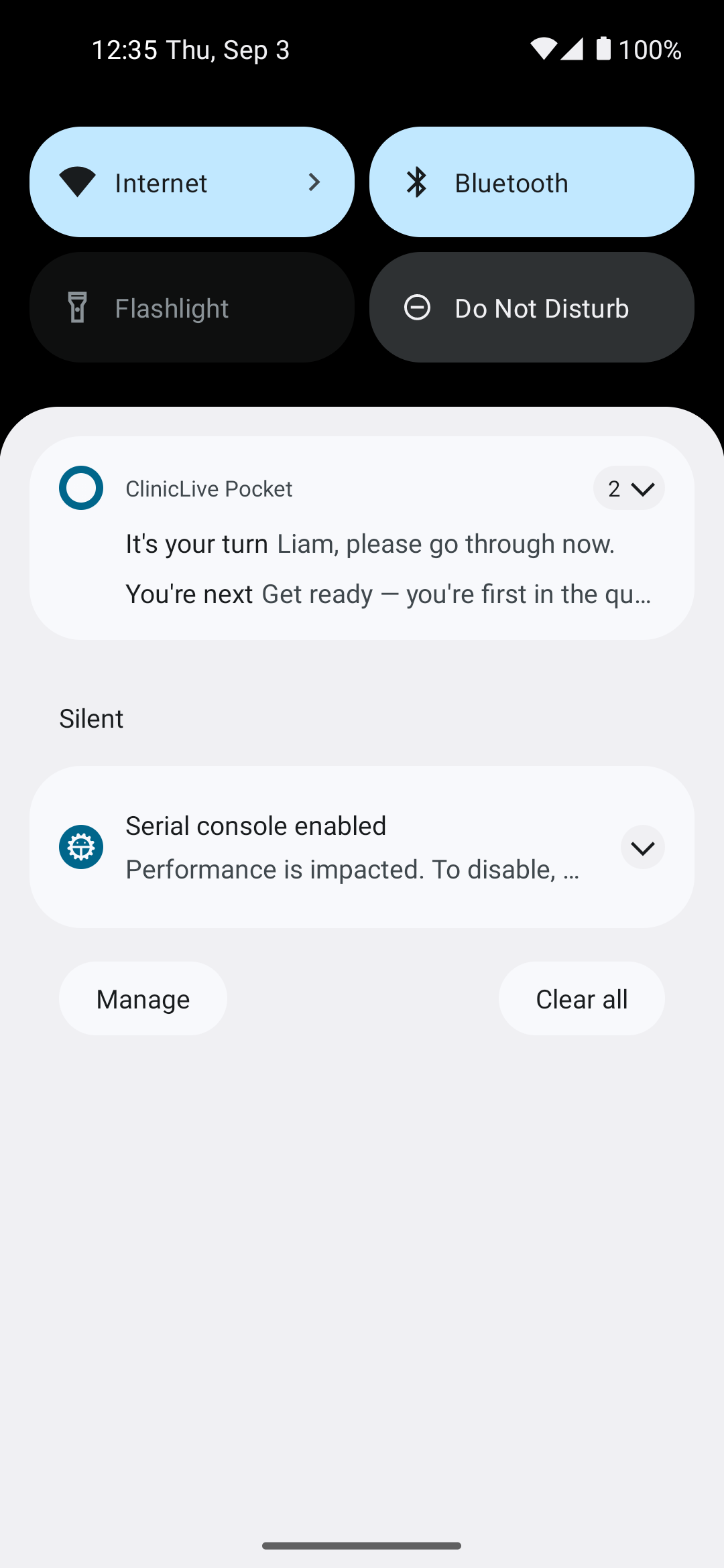 Two call-nexts later
Proof a screenshot can't give
The shade proves the notifications and nothing about the vibrations. Android keeps its own
record: adb shell dumpsys vibrator_manager lists every vibration the system
played, with its source and length. After the demo it listed three from this app: a 182 ms
click at check-in, a 102 ms click for "you're next", and a 403 ms buzz for "it's your
turn" — our 400 ms request as the device ran it. Two clicks of different lengths is fine;
the OS owns how a click feels, we only asked for one. The part of the demo nobody can
photograph, signed off by the vibrator service.
The toast that never came
Now the honest half. On Windows, "Send a test notification" walks the same code:
Register() succeeds, Setting is Enabled — the card
says "Allowed" — and Show() returns without complaint. No toast appears. Not
in the corner, not in the notification center, not anywhere on a full-screen capture.
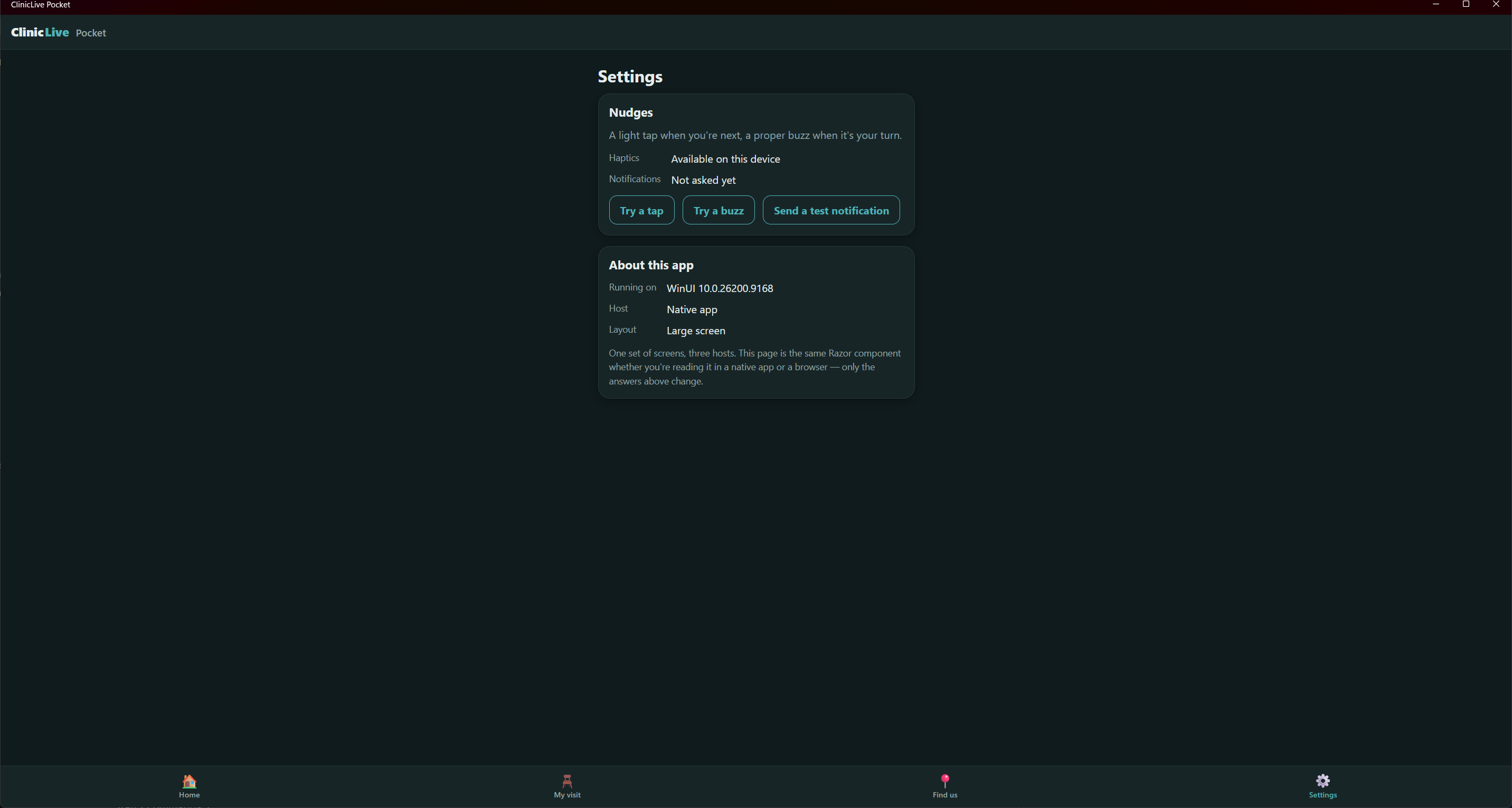 Before
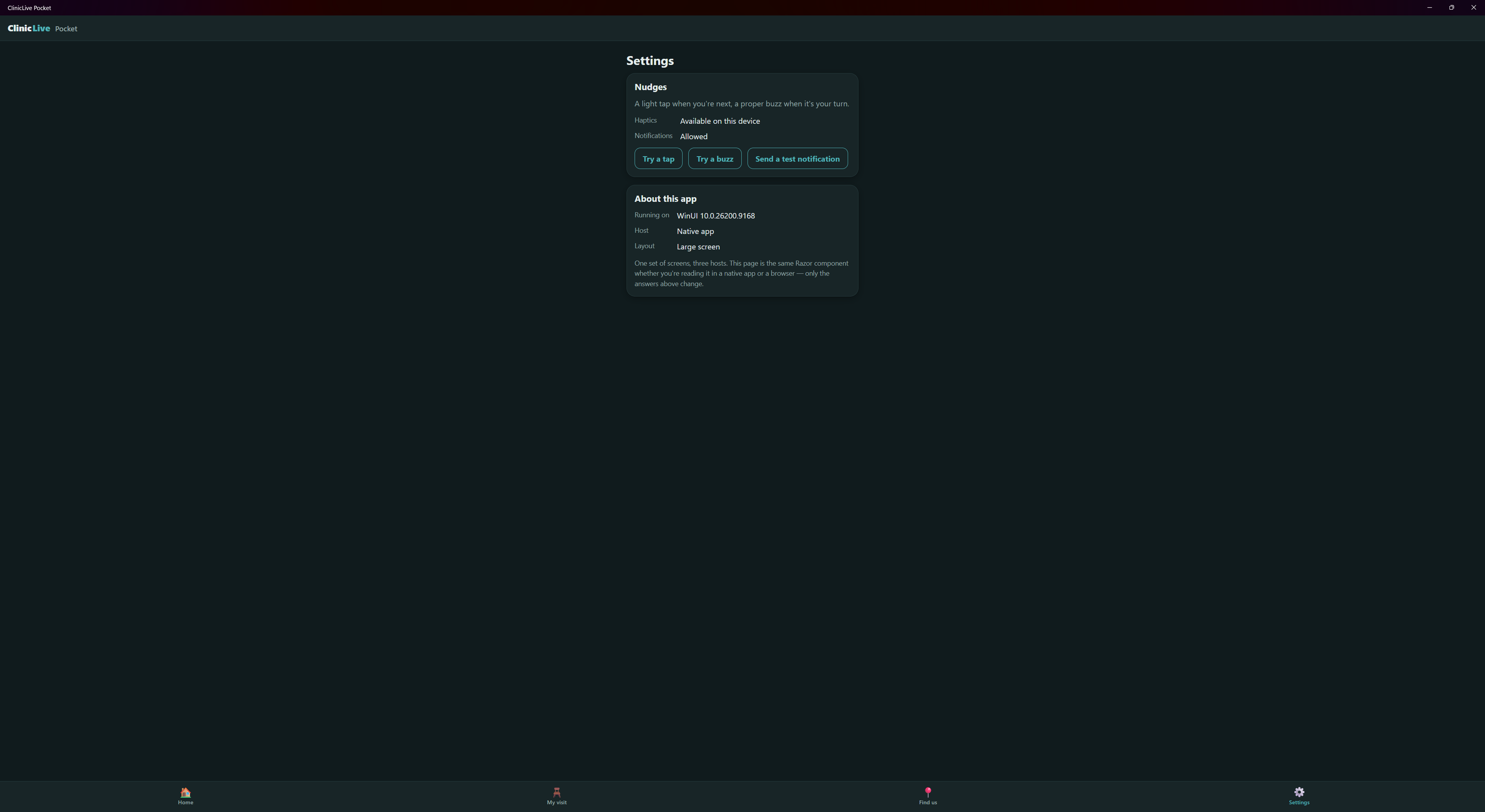 After "Send a test notification"
The chase went as far as it honestly could. The app's identity is registered with a name
and an icon. The docs say an unpackaged app must register before its first window exists,
so Register() moved into OnLaunched: no change. Then the decisive
test: a toast sent to the app's identity from PowerShell, through the same WinRT API, is
silent too — while one sent under PowerShell's own identity banners immediately. The OS is
suppressing this identity, not our code. That's where this part stops. Part 10 names the
likely cause — an unpackaged debug build has no package identity — and
Part 11 explains why the series doesn't
fake the fix. Android is fully proven; Windows toasts stay open for the season.
What the AI got wrong: mostly, this part is about what it couldn't
get right. Every Windows call reported success while nothing happened, and the AI
re-read the docs, moved the registration and rebuilt before questioning whether the
problem was inside the process at all. The lesson is a stopping rule: when the OS
says yes and shows nothing, prove it's the OS with a tool that isn't your app —
the PowerShell test settled it in minutes. Smaller: "Haptics: Available on this
device" on a desktop is HapticFeedback.IsSupported being optimistic, and
the browser host says the same because a server can't feel a visitor's phone —
cosmetic, noted rather than hidden. And one catch in the tooling: the first full-screen
capture on Windows photographed the whole desktop, other windows included. It was
deleted and never committed, and Shot-Windows.ps1 now refuses
-FullScreen unless the app window is maximized, and excludes the taskbar.
A screenshot harness needs a privacy guard, not just a crop.
The meter: ≈ $3.40 on season three's running meter. The Windows toast chase cost most of this part — a dead end is billed at the same rate as a feature, which is the best argument for deciding early what evidence would end it.
Checkpoint: git checkout pocket-05 in
the repo: run the clinic and
the Android app, open one of today's demo bookings and check in — the permission dialog
appears over the visit, not at launch; two "Call next" taps at reception put both
nudges in the shade; adb shell dumpsys vibrator_manager shows the three
vibrations. The suite is still 13-for-13 — nothing in this part is reachable by a unit
test, which is exactly why the evidence came from the OS.
Everything here shares one weakness: it runs inside the app. The hub from Part 4 and the nudges from this part both need the process alive, and patients close apps. Reaching a phone whose app isn't running means a server, a token and Firebase — and a lesson about what "closed" actually means on Android — Part 6: Push, for Real: Firebase Cloud Messaging to a Closed App.