Previously, in Part 7, the app learned where you are and how to get you to the clinic. This part removes the last bit of typing: a QR on the booking ticket, a native camera page pushed over the Blazor UI, and a parser that decides whether what the camera saw is a ticket at all. It is also the part where the bench ran out — and where a unit test caught a bug in a regular expression that no one would have caught by eye.
- Add
TicketQron QRCoder with the URI payloadcliniclive://visit/CODE - Serve
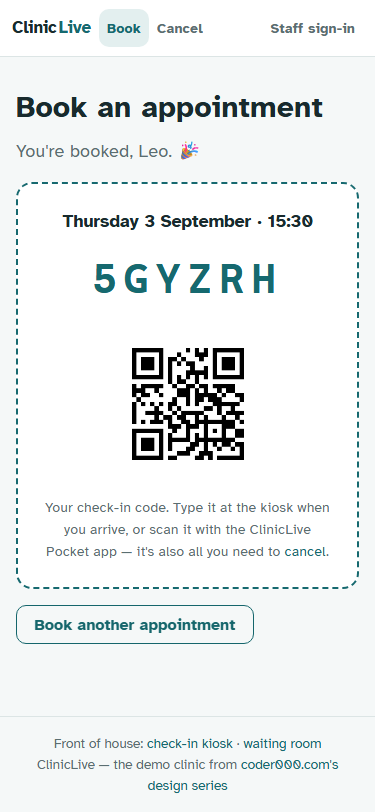
GET /api/pocket/visits/{code}/qr.pngwith a plainCache-Controlheader and a 404 for unknown codes, and show it on the website's ticket on a white tile - Add
ICodeScannerfor phones only: ask for the camera,PushModalAsynca nativeScanPage, return the first QR, pop - Build
ScanPagein C# around ZXing'sCameraBarcodeReaderView: QR only, rear camera, Cancel wired to the back button - Add
.UseBarcodeReader(),CAMERA, and the camerauses-featurewithrequired="false"; show "Scan my ticket" only whenScanner.IsSupported - Write the shared
TicketCode.TryParsewith[A-HJ-KM-NP-Z2-9], tested against a cereal-box URL - Add the round-trip test:
TicketQr.Pngdecoded by ZXing.ImageSharp back to its code - Compare with tag
pocket-08in the repo
The prompt: a QR that says what it is
Verbatim from the commit in the
repo (tag pocket-08):
"Put a QR on the booking ticket and let the app read it. Server:
QRCoder, a tiny URI payload (cliniclive://visit/CODE) so the app recognises
its own tickets, an endpoint that serves the PNG for a known code, the web
ticket showing it on a white tile. App: capability #7, ICodeScanner —
supported on phones only; ask for the camera, push a NATIVE page with a
ZXing camera view over the Blazor UI, resolve with the first QR, pop. A
shared TicketCode parser that accepts the URI, a bare code or a URL with a
code in it, and rejects anything else. A 'Scan my ticket' button on Home
that only appears when scanning is possible. Prove as much as the bench
allows."
"Prove as much as the bench allows" is a prompt that anticipates its own limit, and the limit arrived. The rest is precise about a subtle thing: the payload is a URI, not six bare letters, so the app can recognize its own tickets and a generic reader shows something self-explanatory. And the scanner is "supported on phones only" — a laptop webcam pointed at your face is not something you hold up to a piece of paper.
Model pick: Opus for two judgments — the native-page-over-WebView design, and the question "is the camera a credential?" (no: it produces the same six characters a keyboard would, so scanning changes convenience, not security). Sonnet for the rest: QRCoder, the endpoint, the manifest, the button.
The ticket
The server side is small. QRCoder draws the code, and the payload is the scheme plus the code:
public static class TicketQr
{
    public const string Scheme = "cliniclive://visit/";

    public static string Payload(string code) => Scheme + code;

    public static byte[] Png(string code, int pixelsPerModule = 8)
    {
        using var generator = new QRCodeGenerator();
        using var data = generator.CreateQrCode(Payload(code), QRCodeGenerator.ECCLevel.M);
        using var png = new PngByteQRCode(data);
        return png.GetGraphic(pixelsPerModule);
    }
}
The endpoint joins Part 3's group: GET /api/pocket/visits/{code}/qr.png, 404
for a code the clinic doesn't know, and a plain Cache-Control header for a day
because the image for a code never changes. (The first draft used
.CacheOutput(), which needs the output-cache middleware registered — swapped
before it could throw at runtime.) The website's ticket from season two gains an
<img> pointing at that endpoint, on a white tile so it stays scannable in
dark mode, and its hint now reads "or scan it with the ClinicLive Pocket app".
The party trick: a native page over the WebView
Capability seven is the first that can't be answered from inside the WebView at all. The trick is remembering what a Blazor Hybrid app actually is: a native app whose main page happens to be a WebView. Native pages can be pushed on top of it.
public sealed class CodeScanner : ICodeScanner
{
    // Phones and tablets have a camera you'd hold up to a ticket; a laptop webcam
    // pointing at your face does not count.
    public bool IsSupported =>
        DeviceInfo.Platform == DevicePlatform.Android || DeviceInfo.Platform == DevicePlatform.iOS;

    public async Task<string?> ScanAsync()
    {
        /* … Permissions.Camera: check, request, null if refused … */

        var host = Application.Current?.Windows.FirstOrDefault()?.Page;
        /* … no page yet → null … */

        var page = new ScanPage();
        await host.Navigation.PushModalAsync(page);
        try
        {
            return await page.Result;
        }
        finally
        {
            if (host.Navigation.ModalStack.Contains(page))
            {
                await host.Navigation.PopModalAsync();
            }
        }
    }
}
Ask for the camera, push a modal page, await a TaskCompletionSource, pop.
ScanPage itself is one C# file and no XAML: ZXing.Net.Maui's
CameraBarcodeReaderView restricted to QR codes on the rear camera, a hint
label, a Cancel button, and the Android back button wired to cancel:
_camera = new CameraBarcodeReaderView
{
    Options = new BarcodeReaderOptions
    {
        Formats = BarcodeFormat.QrCode,
        AutoRotate = true,
        Multiple = false,
    },
    CameraLocation = CameraLocation.Rear,
};
_camera.BarcodesDetected += OnDetected;

/* … hint label, Cancel button, a Grid stacking camera, hint and button … */

private void OnDetected(object? sender, BarcodeDetectionEventArgs e)
{
    var first = e.Results.FirstOrDefault()?.Value;
    if (!string.IsNullOrWhiteSpace(first))
    {
        // Detection arrives on a camera thread; the page is UI.
        MainThread.BeginInvokeOnMainThread(() => Finish(first));
    }
}
Three lines of plumbing make it real: .UseBarcodeReader() on the MAUI builder,
CAMERA in the manifest, and uses-feature android.hardware.camera
with required="false" — a device without a camera can still install the app,
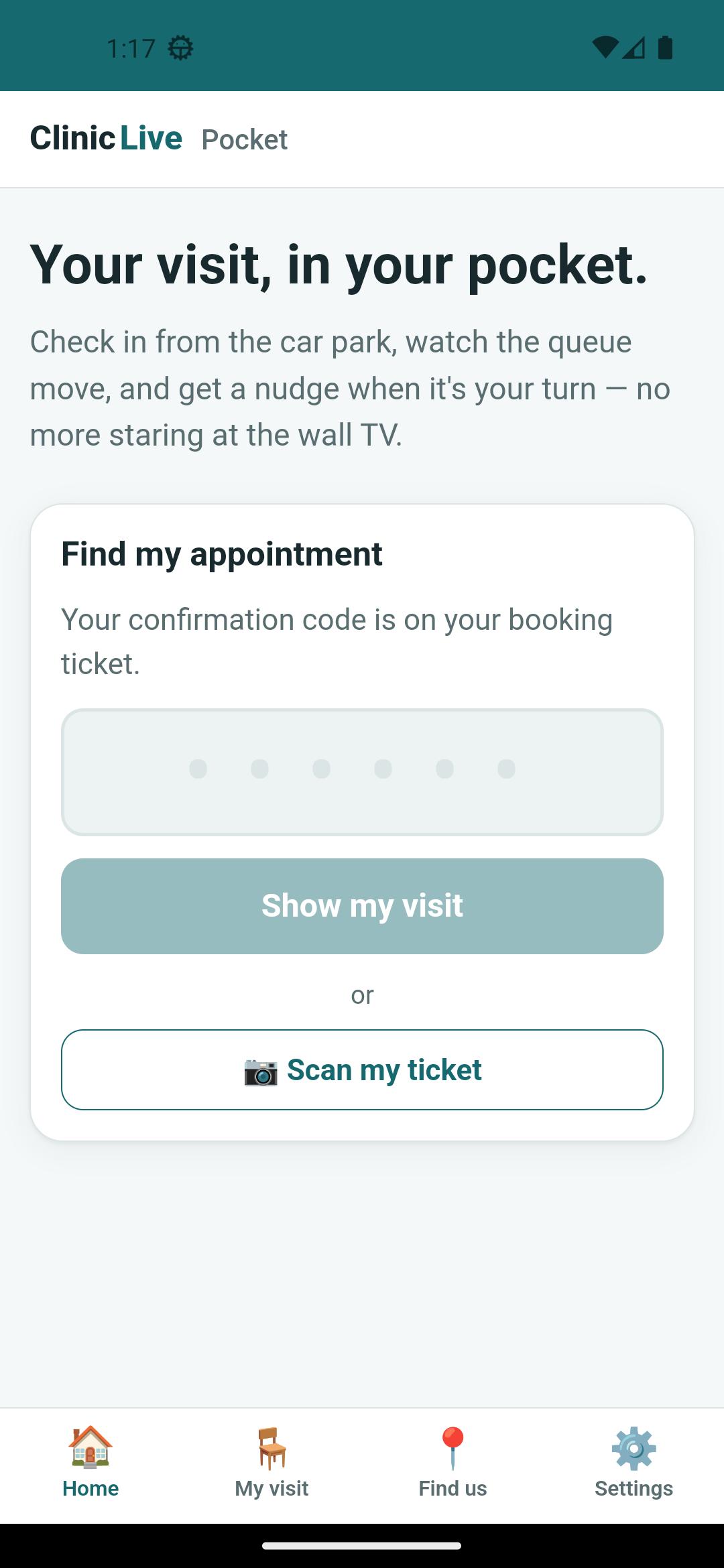
because the code can always be typed. Home shows "📷 Scan my ticket" only when
Scanner.IsSupported says so; the browser host's answer is a plain "not here",
and its visitors type six characters.
 Home, on a phone
 After the tap
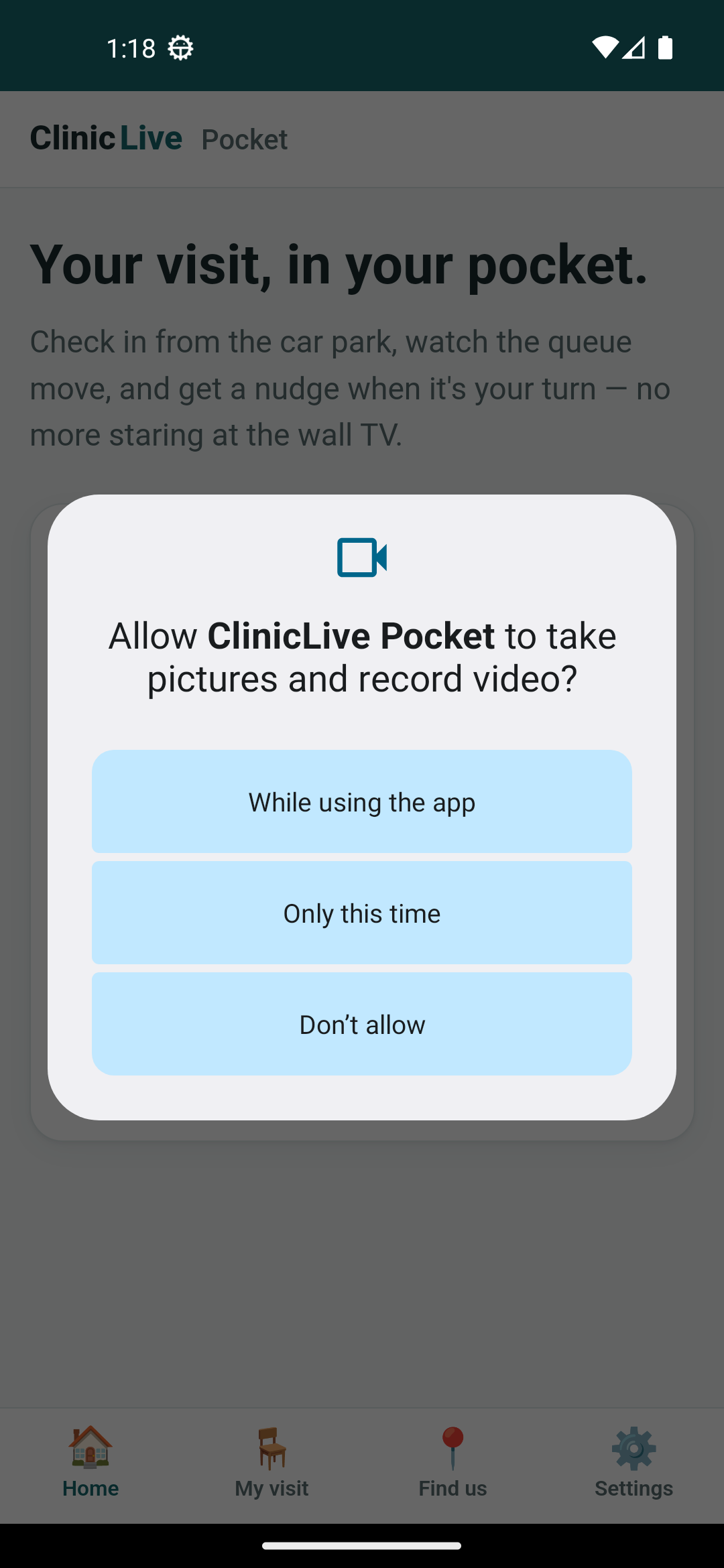
IsSupported is true; the browser host
never renders it. Camera permission is asked at the tap — the same rule as
notifications in Part 5 and location in Part 7.
The parser, and the regex that lied
The camera returns raw text; TicketCode.TryParse, in the shared project,
decides whether it's a ticket. The clinic's alphabet has no 0, O, 1, I or L; a code is six
of those characters standing alone — so the URI, a bare code and a URL with the code in a
query string all work, and a random QR from a cereal box doesn't:
public static partial class TicketCode
{
    // The alphabet is ABCDEFGHJKMNPQRSTUVWXYZ23456789. The first draft wrote the class as
    // [A-HJ-NP-Z2-9] — and J-N spans J,K,L,M,N, quietly letting L back in. The test that
    // feeds it a cereal-box URL ("cereal" = six letters) went red and caught it.
    [GeneratedRegex("(?<![A-Z0-9])([A-HJ-KM-NP-Z2-9]{6})(?![A-Z0-9])", RegexOptions.IgnoreCase)]
    private static partial Regex CodePattern();

    public static bool TryParse(string? raw, out string code)
    {
        /* … match, upper-case the captured group, true; otherwise false … */
    }
}
Read the first draft's character class slowly: [A-HJ-NP-Z2-9]. It skips I by
stopping at H and restarting at J. It skips O by stopping at N and restarting at P. But the
range J-N is J, K, L, M, N — and L is banned. Nobody reads a regex range letter by letter,
and the AI didn't either. The test did: the rejection theory feeds it
https://cereal.example/box-of-flakes, and "cereal" is six letters standing
alone between // and a dot. With L allowed, it parsed as the ticket
CEREAL. The fix splits the range — J-K, M-N — and the
comment keeps the story. Character ranges are where regexes lie.
What the bench could not stage
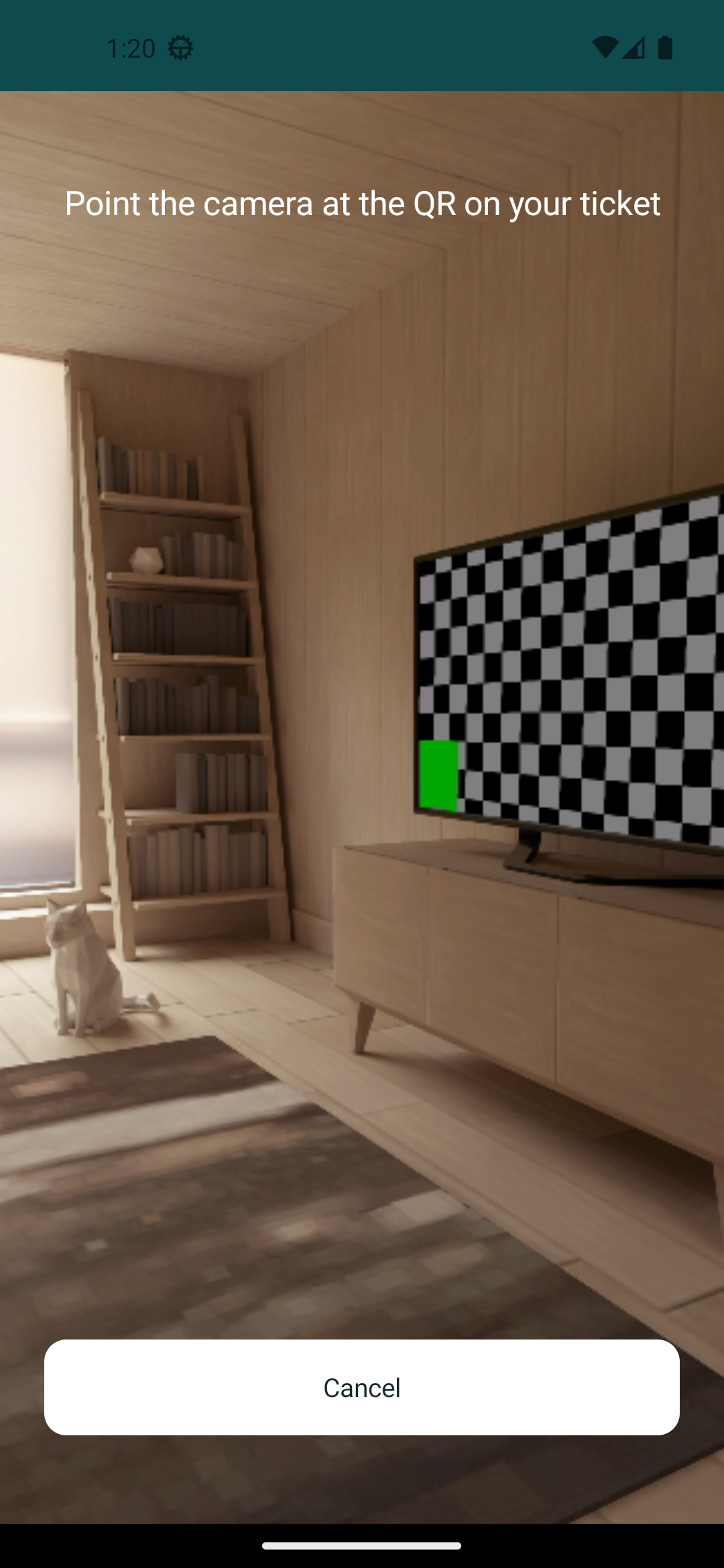
Here is the limit the prompt anticipated. The permission dialog and the live camera page
were photographed. A decode was not. The Android emulator can, in principle, put a poster
into its virtual scene — a -virtualscene-poster launch option, and a matching
adb emu command — and both accepted the QR image without complaint. The poster
never appeared. The room was swept through 360 degrees and tilted with mouse automation
(the script survives in the repo as Look-Around.ps1, kept as a curiosity),
for about forty minutes, and the checkerboard TV was the only pattern the camera ever saw.
So, plainly: no on-device QR decode was photographed in this series, and no screenshot in
this post shows one.
What the bench could do is prove every link of the chain except the lens. The server draws the PNG; a real decoder — ZXing, the same family the phone runs — reads it back; the app's parser pulls the code out. The ImageSharp binding is managed-only, so the test runs on Linux CI too:
[Fact]
public void The_ticket_qr_decodes_back_to_its_code()
{
    var png = TicketQr.Png("PWPAP2");

    using var image = Image.Load<Rgba32>(png);
    // Fully qualified: ZXing and ZXing.ImageSharp both define a BarcodeReader<T>.
    var reader = new ZXing.ImageSharp.BarcodeReader<Rgba32> { Options = { PossibleFormats = [BarcodeFormat.QR_CODE] } };
    var result = reader.Decode(image);

    Assert.NotNull(result);
    Assert.Equal("cliniclive://visit/PWPAP2", result.Text);
    Assert.True(TicketCode.TryParse(result.Text, out var code));
    Assert.Equal("PWPAP2", code);
}
If the payload format drifts, the error-correction level stops a decode, or the parser stops recognizing the URI, this goes red before a patient's ticket does. It is a weaker proof than a phone reading a screen, and the series says so; it is also a proof that runs on every push, which the phone never would.
What the AI got wrong: the regex, first and most important — a
character class that read correctly and wasn't, which a human review would have waved
through too; it's in this post only because a four-input rejection test was cheap to
write. Then the small ones: .CacheOutput() without the middleware that
makes it work; a CS0104 ambiguity because ZXing and its ImageSharp binding both define
BarcodeReader<T>; a ticket screenshot taken before the image loaded.
And the expensive one: about forty minutes of automation chasing a poster the emulator
advertises and never drew, where the better move — deciding what evidence would
substitute — came late. The lesson of the part: the bug that would have hurt a patient
was found by the cheapest tool in the series.
The meter: ≈ $5.60 on season three's running meter. The poster hunt was the most expensive dead end of the season so far, and it bought a script nobody needs; the feature itself was cheap.
Checkpoint: git checkout pocket-08 in
the repo: book on the
website and the ticket carries a QR; fetch
/api/pocket/visits/{code}/qr.png for a real code and a 404 for a made-up
one; on Android, Home shows "Scan my ticket", the camera dialog appears at the tap, and
the scanner page opens over the app — on a real phone that is where you'd point it at
the ticket, which this bench could not. 28 tests green, including the round trip and
the cereal box.
The app now does everything a patient needs while it's open and online. Part 9: Offline and Settings: Remember the Visit, Survive a Dead Signal is about neither: remembering the visit on the phone, showing what the clinic last said when there's no signal, and — at last — a setting for the physical phone that Part 3 promised.