Previously, in Part 3, the clinic got a door and the phone got a real My-visit screen — with a Refresh button and a card admitting it wasn't live yet. Season one's board never needed a Refresh button; it listens to a SignalR hub and re-reads the queue the moment it changes. The phone can do the same. It can also be put in a pocket, frozen by the OS, and carried into a car park with no signal, which a wall TV never does — and that difference is most of this part.
- Prompt that the phone is just another wall TV: join the
boardgroup on the existingQueueHuband re-read the visit onQueueChanged - Add a singleton
QueueLivewith oneHubConnectionto the host'sClinicEndpoint.QueueHub, started byEnsureStartedAsyncbehind a semaphore - On
Reconnected, callJoinBoardagain and raiseChangedto catch up - Add
IAppLifecycle: MAUI answers from theWindowinApp.CreateWindow, the web host is a no-op, andResumedmeans reconnect and re-read - On the Visit page, subscribe with
@implements IDisposable, show the "reconnecting" pill only when down, put@keyon the number, and delete Refresh - Replace
WithAutomaticReconnect()'s default with aKeepTryingretry policy that never returns null - Test: background the app while someone checks in, resume, call next, then stop and restart the clinic server
- Compare with tag
pocket-04in the repo
The prompt: the phone is just another wall TV
Verbatim from the commit (tag pocket-04):
"Make My-visit live. The phone is just another wall TV: connect to
the existing QueueHub, join the 'board' group, and on 'QueueChanged' re-read
the visit from the API — notify, don't ship state, exactly as in Season 1.
One HubConnection per app, started on demand and shared by every screen,
with automatic reconnect that re-joins the group and catches up. Add a
second capability interface, IAppLifecycle: a phone gets paused and resumed
all day and sockets die in the background, so Resumed must mean 'reconnect
and re-read'; MAUI answers from the Window's events, the web host is an
honest no-op. Show a 'reconnecting…' pill only when the connection is down,
animate the position number when it changes, and delete the Refresh button.
Prove it: check Emma in, background the app while someone else books,
resume, then have reception call next while her screen is open."
Every clause is a decision from an earlier season, re-applied. "Notify, don't ship state" is season one's Part 7: the hub carries one signal and clients re-query, so there are no stale payloads and no ordering races. "Only when the connection is down" is season two's Part 6: plumbing status is shown only when something is wrong. And the animated number is season two's Part 9: motion that explains a change. The new thing is one sentence long — Resumed must mean reconnect and re-read — and it's the sentence a web developer has never had to write.
Model pick: Opus, high effort, for the connection and lifecycle design — an idempotent start, what to do when the very first start fails, what "resume" has to mean for a socket that died in the background. Those are semantics, and getting them subtly wrong produces an app that works on the desk and fails in the car park. The page itself went to Sonnet.
The same hub, a third client
Season one's hub is deliberately thin, and it hasn't changed:
/// The queue hub is deliberately "thin": it carries a single signal — QueueChanged —
/// and clients re-query the database for fresh state. Notify, don't ship state:
/// no stale payloads, no ordering races, one source of truth.
public class QueueHub : Hub
{
    public const string BoardGroup = "board";

    public Task JoinBoard() => Groups.AddToGroupAsync(Context.ConnectionId, BoardGroup);
}
The wall TV joins the board group and re-reads on QueueChanged. The
phone does exactly the same, re-reading /api/pocket/visits/{code} instead of the
database — the same SignalR client package the board uses, added to the shared project with a
one-line reason: "a phone is just another board." Where the hub lives is the host's business,
so it becomes a tiny record each host supplies alongside the base address it already knew:
/// Where the clinic's server is. Each host decides; everything shared just asks.
public sealed record ClinicEndpoint(Uri Base)
{
    public Uri QueueHub => new(Base, "hubs/queue");
}
One connection per app
A browser tab has one page and one connection, and when the tab closes so does the socket.
An app has many screens and one process, and a connection per screen would be a bug you'd
only notice on the server. So QueueLive is a singleton: one
HubConnection, started by the first screen that needs it, reused by every
screen after.
_hub.On("QueueChanged", () => Changed?.Invoke());

_hub.Reconnecting += _ =>
{
    ConnectionChanged?.Invoke(false);
    return Task.CompletedTask;
};
_hub.Reconnected += async _ =>
{
    await _hub.InvokeAsync("JoinBoard");   // groups don't survive a reconnect
    ConnectionChanged?.Invoke(true);
    Changed?.Invoke();                     // catch up on whatever we missed
};

lifecycle.Resumed += () => _ = EnsureStartedAsync(catchUp: true);
Two details here only bite in production. Group membership belongs to a
connection, so after a reconnect the new connection must join board
again or it sits there, connected and deaf. And a reconnect isn't a resume: while the socket
was down, patients were called, so Reconnected raises Changed to
make the screen re-read. Starting is idempotent and serialized behind a semaphore, because
two screens can ask at once:
/// Idempotent: the first screen that needs live data starts the connection; later ones reuse it.
public async Task EnsureStartedAsync(bool catchUp = false)
{
    await _gate.WaitAsync();
    try
    {
        if (_hub.State == HubConnectionState.Disconnected)
        {
            await _hub.StartAsync();
            await _hub.InvokeAsync("JoinBoard");
            _started = true;
            ConnectionChanged?.Invoke(true);
            catchUp = true;
        }
    }
    catch (Exception)
    {
        // The clinic is down or unreachable. WithAutomaticReconnect only kicks in
        // after a successful start, so the next Resumed (or screen) tries again.
        ConnectionChanged?.Invoke(false);
        return;
    }
    finally
    {
        _gate.Release();
    }
    /* … if (catchUp && _started) Changed?.Invoke(); … */
}
That catch is a decision, not a shrug. SignalR's automatic reconnect only arms
itself after a successful first start, so an app opened in a dead zone would otherwise never
connect at all. Swallowing the first failure and letting the next resume — or the next
screen — try again is what makes "open the app in the car park, walk inside" work.
Capability #2: is the app in front of the user?
A server-rendered web page is never paused. A phone app is paused, frozen and resumed all day, and Android will happily kill the socket of anything in the background. The shared code needs to know when the user comes back, and it needs to know it without referencing MAUI — so it's the second capability interface, as small as the first:
/// Capability #2: "is the app in front of the user?" A phone app is paused, frozen and
/// resumed all day; a server-rendered web page simply isn't. Sockets die in the
/// background, so anything live must re-sync on Resumed.
public interface IAppLifecycle
{
    event Action? Resumed;
    event Action? Paused;
}
MAUI's answer comes from the Window. One instance for the whole process, fed by
App.CreateWindow — the one place that knows the events are a MAUI window's — and
handed to the shared code by DI:
public sealed class AppLifecycle : IAppLifecycle
{
    public static AppLifecycle Instance { get; } = new();

    public event Action? Resumed;
    public event Action? Paused;

    public void Attach(Window window)
    {
        window.Resumed += (_, _) => Resumed?.Invoke();
        window.Stopped += (_, _) => Paused?.Invoke();
    }
}
The browser's answer is the most honest class in the repository:
/// The browser's answer: a server-rendered page is never "paused" from the server's
/// point of view — the circuit either exists or it doesn't. Honest no-op.
public sealed class AppLifecycle : IAppLifecycle
{
    public event Action? Resumed { add { } remove { } }
    public event Action? Paused { add { } remove { } }
}
One quieter asymmetry is worth naming: the web host registers a single
QueueLive for the whole process, shared by every visitor's circuit — one
socket fanning out to many pages, a fan-out singleton rather than a per-user connection.
Part 10 will say so again.
The screen: status only when something is wrong
The Visit page subscribes while it's on screen and unsubscribes when it isn't
(@implements IDisposable). Hub callbacks arrive on a background thread, so
every one of them is marshaled through InvokeAsync before touching state. The
pill appears only when the connection is down:
@if (_visit is not null && !_connected)
{
    <span class="pill pill-warn">reconnecting…</span>
}
/* … */
<p class="big-number" @key="_visit.Position">@(_visit.Position?.ToString() ?? "—")</p>
The @key on the number is the season-two trick in one attribute: when the
position changes, Blazor re-creates the element instead of updating it, and a plain CSS
entry animation becomes the update cue — no JavaScript, no toast:
/* @key on the number: a changed position re-renders the element, and the entry
   animation is the update cue — no JS, no toast (Season 2, Part 9). */
.big-number { animation: rise-in 320ms ease-out; }
@keyframes rise-in {
    from { opacity: 0; transform: translateY(0.35em); }
    to   { opacity: 1; transform: none; }
}
Under the card, one line replaces Part 3's whole Refresh card: "Live — updates the moment the queue moves." when connected, "Showing the last thing the clinic told us." when not. The Refresh button is gone.
The demo, frame by frame
The prompt's last sentence is a choreography, and it was run exactly as written with Emma (DEMO22) on the emulator, David C. already being served and Omar already waiting.
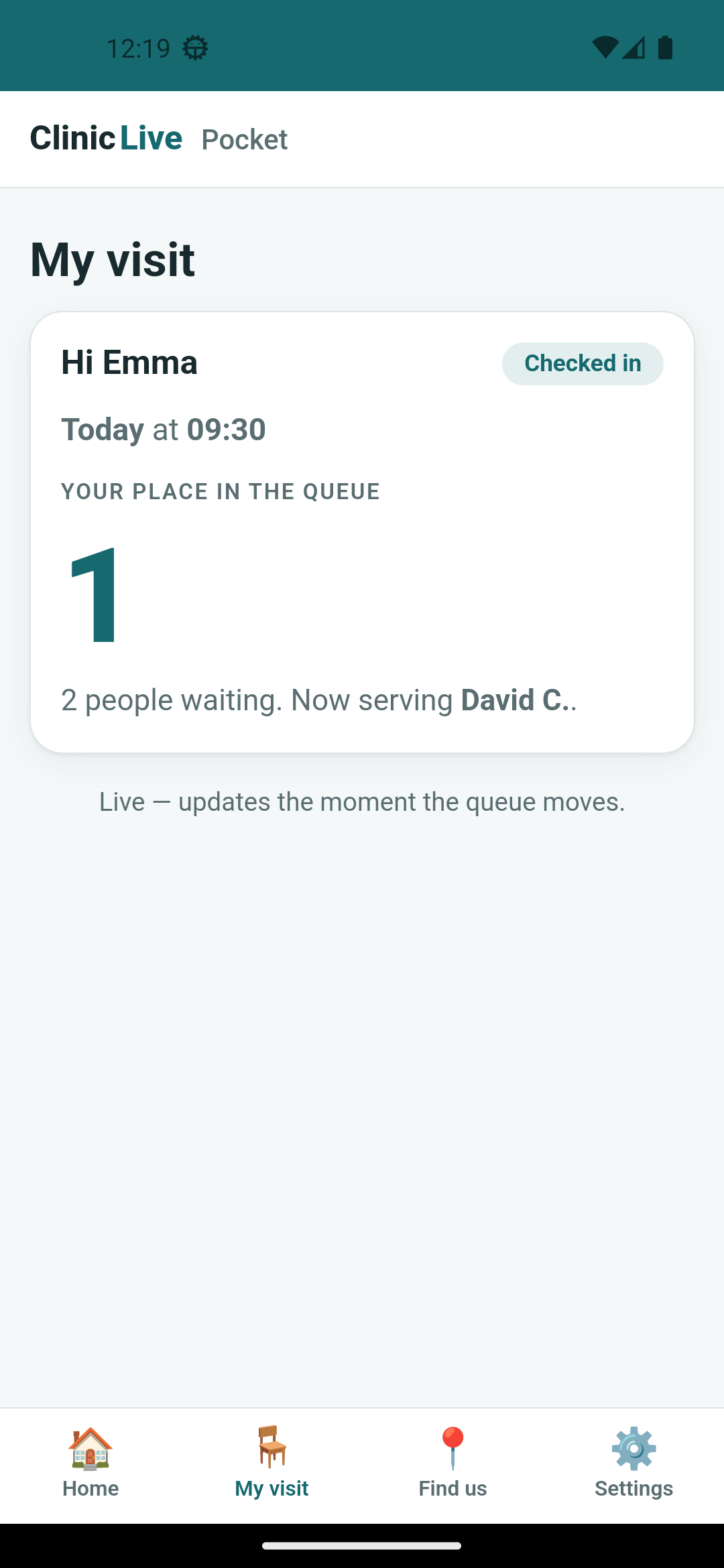 Checked in
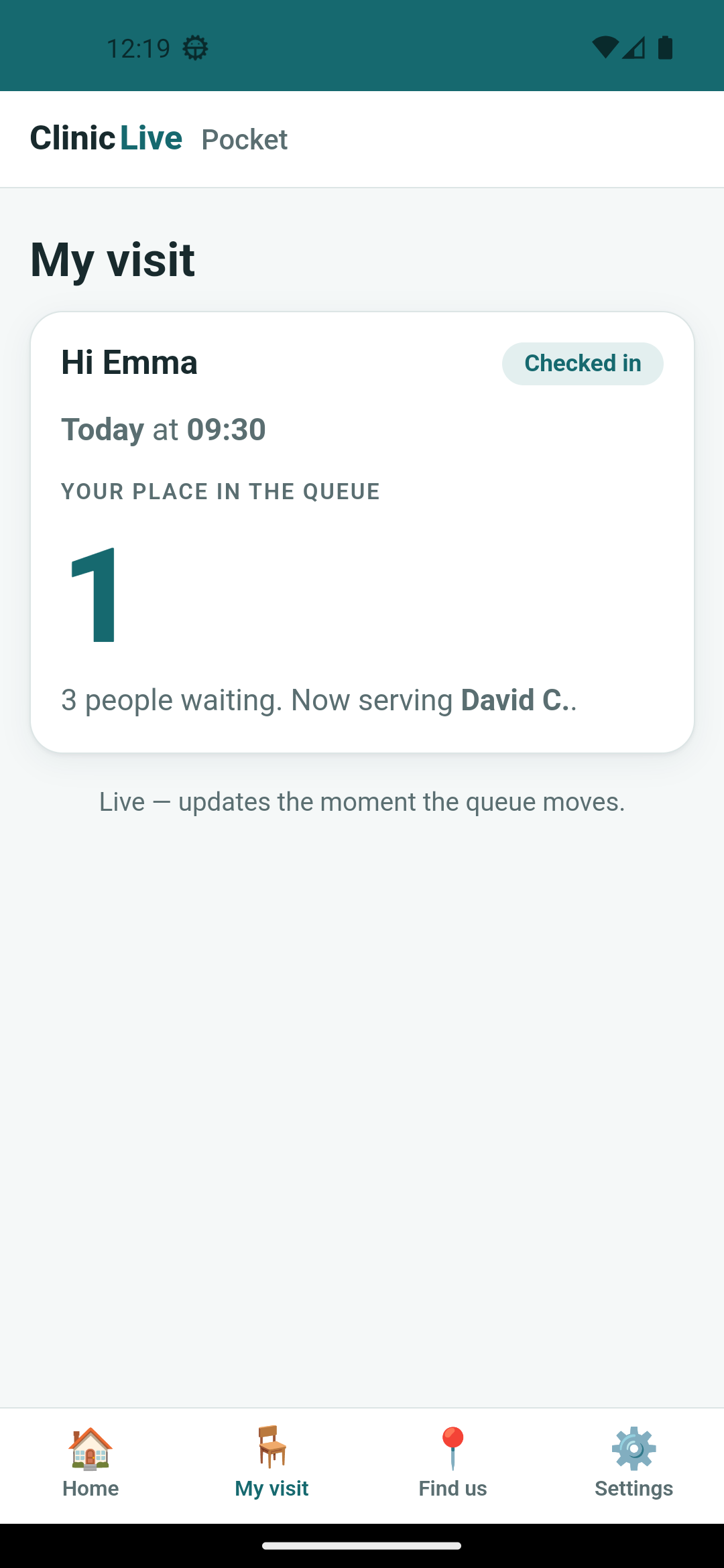 Resumed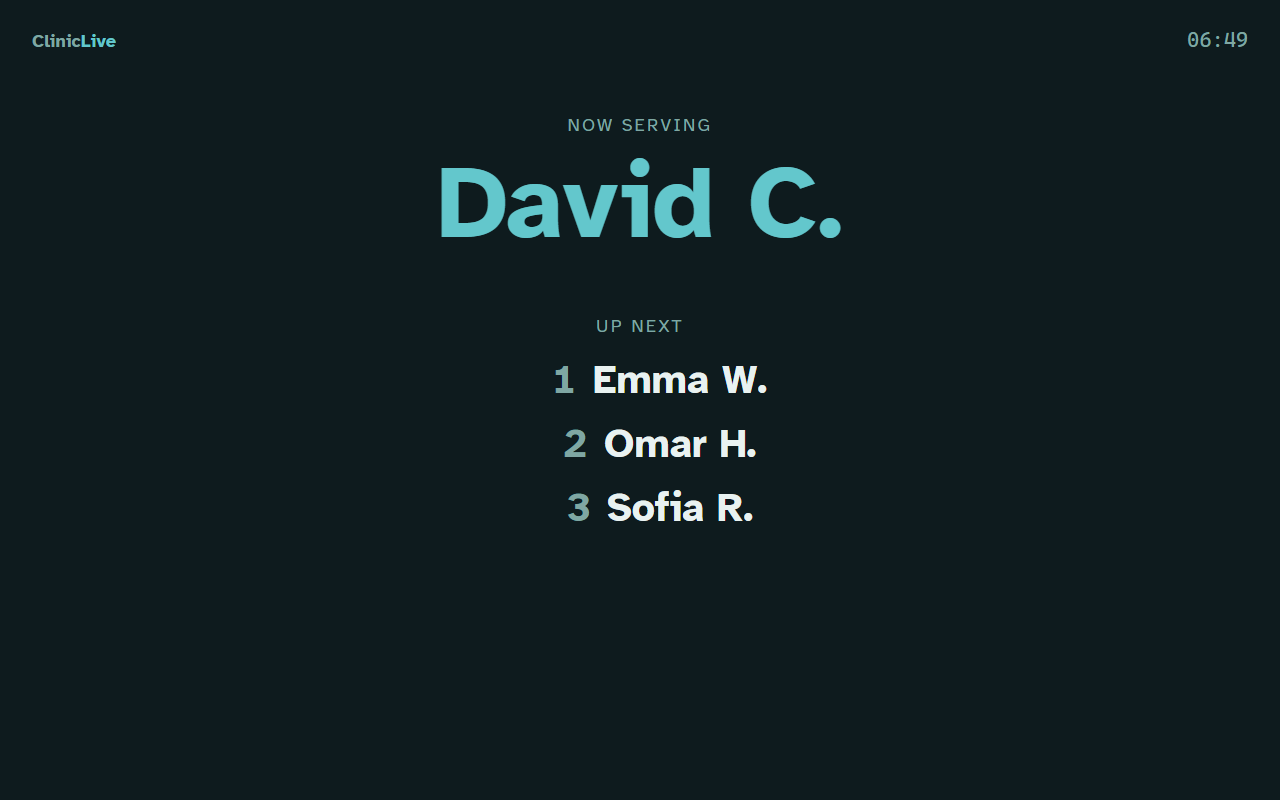
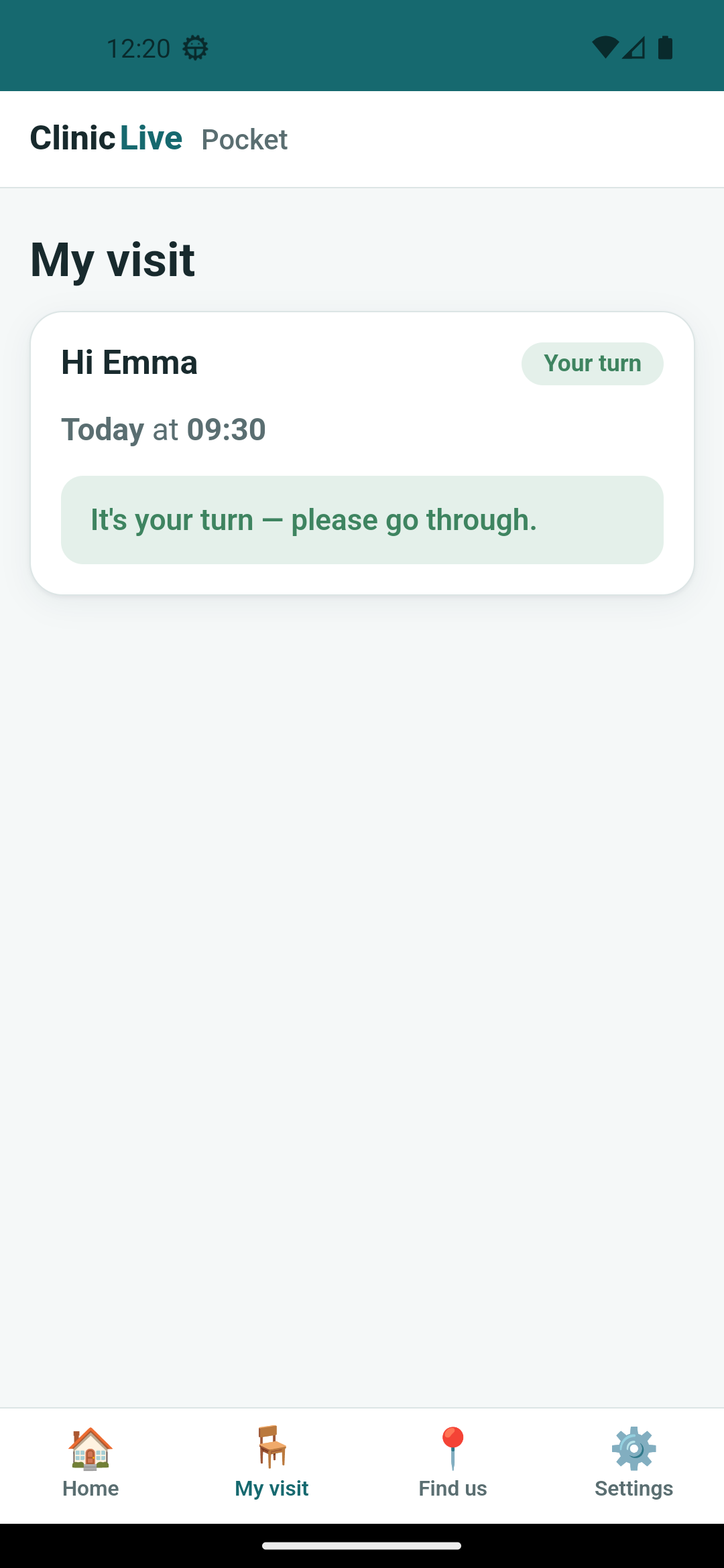
QueueChanged and one re-read.
The catch of the part: a reconnect that gave up
The last scene wasn't in the prompt. Kill the clinic server, wait about fifteen seconds, start it again — the sort of thing a deploy does. The pill said "reconnecting…", correctly, and the last known state stayed on screen underneath it, correctly. Then the server came back. And a full minute later the pill was still there.
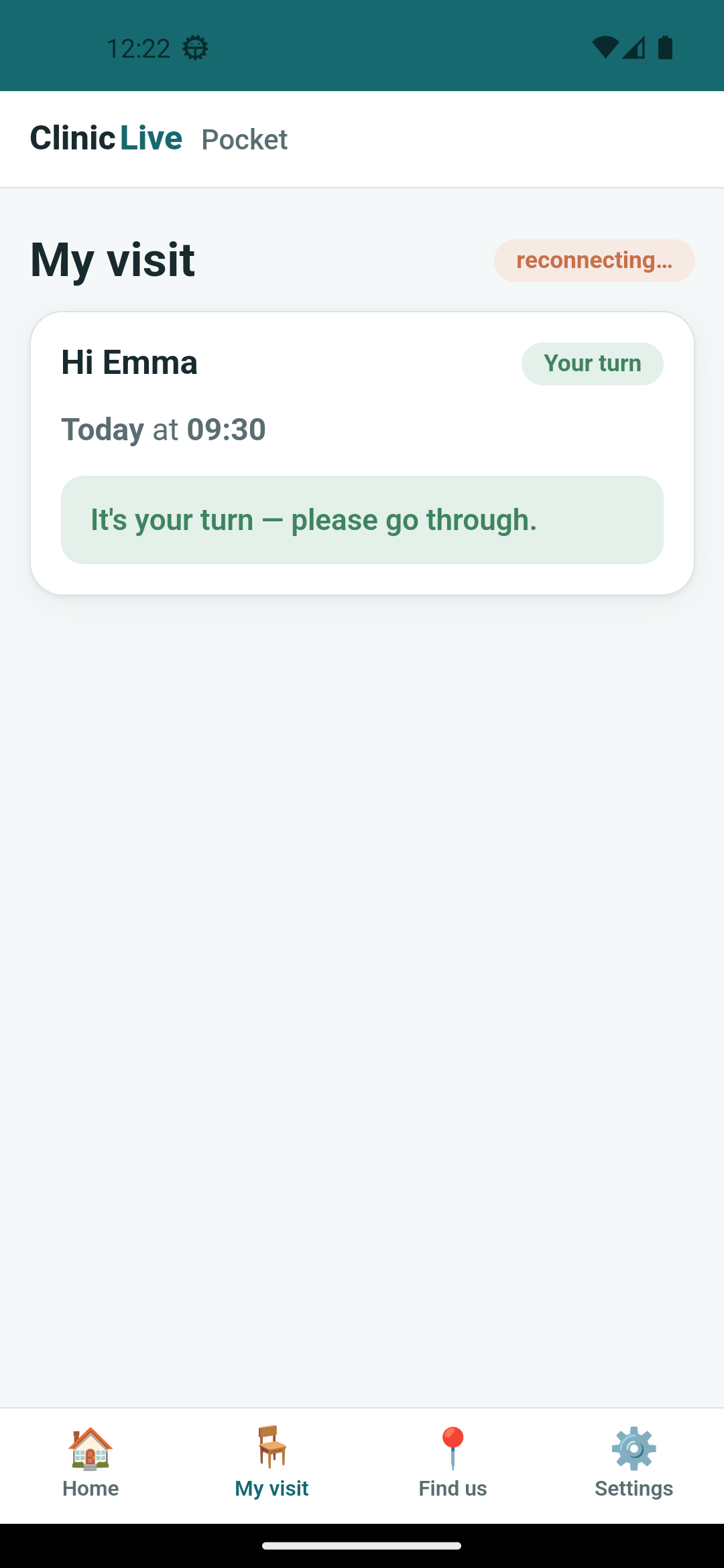 Server back; still "reconnecting…"
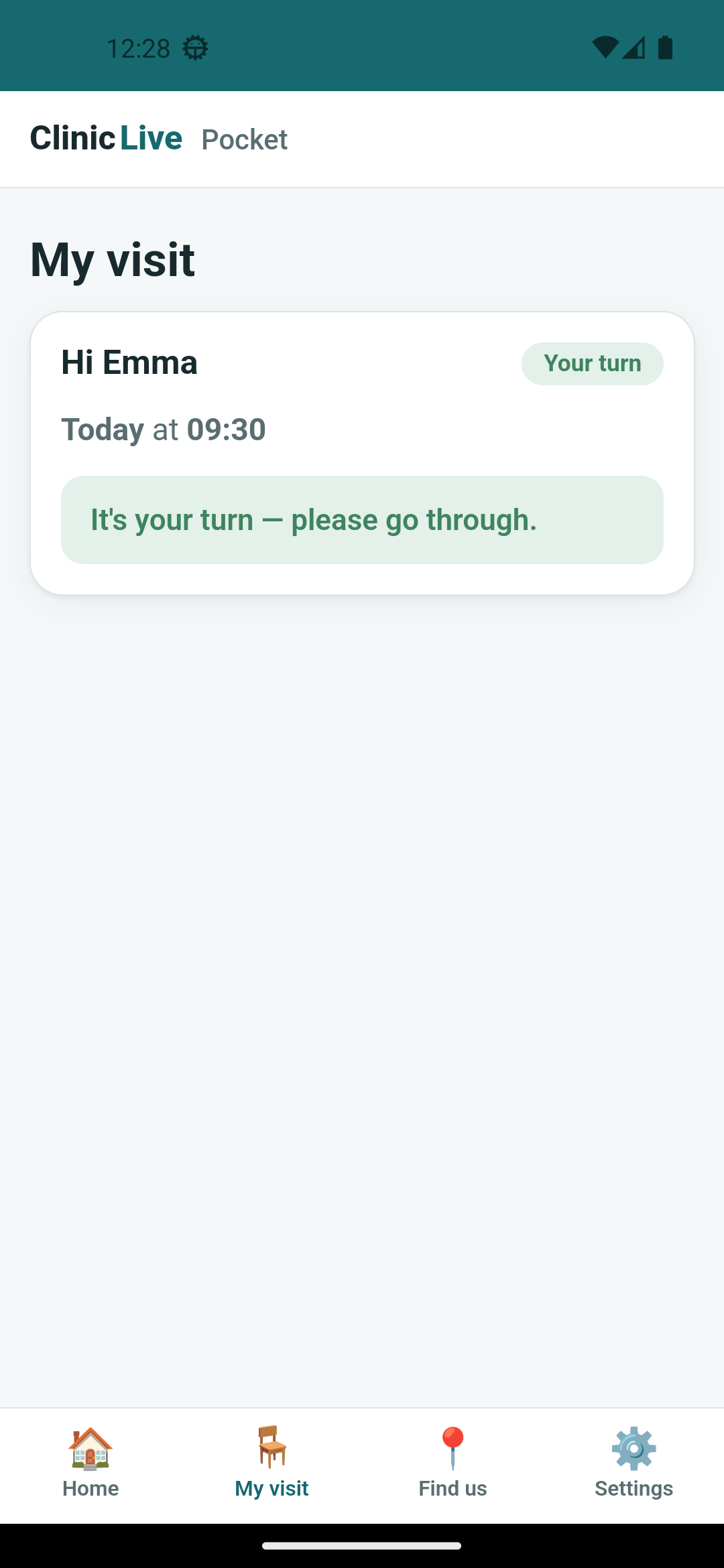 After the fix
WithAutomaticReconnect() with no arguments retries after 0, 2, 10 and 30
seconds and then gives up forever — the connection goes to Closed and
nothing will ever start it again. That's a fine default for a browser tab, where the human
will refresh. It is wrong for a phone that lives in a pocket and whose owner will never
refresh anything. The fix is a retry policy that never returns null:
// NOT the default policy. WithAutomaticReconnect() tries at 0, 2, 10 and 30
// seconds and then gives up forever — fine for a browser tab someone will
// refresh, wrong for a phone in a car park. The screenshot that proved it:
// server back, pill still saying "reconnecting…". Keep trying, with backoff.
_hub = new HubConnectionBuilder()
    .WithUrl(endpoint.QueueHub)
    .WithAutomaticReconnect(new KeepTrying())
    .Build();

/// 2s, 4s, 8s, 16s, then every 30s — and never returns null, so it never stops.
private sealed class KeepTrying : IRetryPolicy
{
    public TimeSpan? NextRetryDelay(RetryContext retryContext) =>
        TimeSpan.FromSeconds(Math.Min(30, Math.Pow(2, retryContext.PreviousRetryCount + 1)));
}What the AI got wrong: the default reconnect policy is the real one —
documented, sensible, and reached for exactly as it would be for a web page, because a
web page is what the model has seen most. Only a screenshot taken a minute too late
showed that "automatic reconnect" has an expiry date. Two other findings were not bugs
at all, which is its own lesson: cold start grew from about 4 to about 7.5 seconds once
the SignalR client was in the app, so the harness's taps at four seconds were silently
dropped and a slow app photographed like a broken one (the harness now
waits about ten seconds; Part 11 will care what every package costs at startup); and the
emulator dimmed its screen for inactivity, producing grey frames until
adb shell svc power stayon true. A screenshot loop needs a skepticism step,
or it will fix things that were never wrong. "David C.." and two compiler warnings left
over from Part 2's insets code were tidied here too.
The meter: ≈ $2.60 on season three's running meter. The connection code was cheap; the demo choreography — five states, two devices, a killed server, and re-shoots for the dimmed and dropped frames — burned screenshots, and screenshots are image tokens.
Checkpoint: git checkout pocket-04 in
the repo. Check a demo code in
from the emulator, send the app to the background, check someone else in from the kiosk,
bring the app back and watch the count change without a touch; call next from the staff
queue with the screen open and watch it flip to "It's your turn". Then stop the clinic
server, count to twenty, start it again and watch the pill go away. The Refresh button is
gone. Still 13 tests green — nothing about the rules changed, only who hears about them.
The screen now knows the instant it's Emma's turn. Emma, looking at the pharmacy shelves, does not — her phone is in her pocket. It needs to tap her when she's next and buzz when it's time, and it needs to ask permission to notify at a moment that explains itself, not at launch. Two more capabilities, and the season's first honest "it didn't work" on Windows — Part 5: Buzz When You're Next: Haptics and Notifications, Permission in Context.