Previously, in Part 1, we drew the map: one set of Razor screens, a MAUI host for the phone and the desk, a web host for the browser, and a rule that every native feature is an interface each host answers honestly. Now the map becomes projects. This part scaffolds the season, strips the template, moves the porcelain-and-petrol tokens into a phone-first stylesheet, proves the pattern with the smallest possible capability — and photographs the result on three hosts, which is where the trouble starts.
- Scaffold with
dotnet new maui-blazor-webintosrc/and addClinicLive.Contractsfor the shared DTOs - Strip the template (Bootstrap, Counter/Weather, sidebar) and set the app id
com.cliniclive.pocket - Move the season-two tokens into a phone-first
pocket.csswith a bottom tab bar and the platform's own font - Declare
IPlatformInfoin the shared project and register each host's answer:AddSingleton<IPlatformInfo, PlatformInfo>() - Add a
/settingspage that shows which host is rendering - Install on a running emulator with
dotnet build src/ClinicLive.Pocket -f net10.0-android -t:Install, then photograph all three hosts - Fix what the shots show: petrol in
colors.xml, system-bar insets inMainActivity, theh1[tabindex]ring,ASPNETCORE_ENVIRONMENT=Developmentfor the web host - Compare with tag
pocket-02in the repo
The prompt: architecture first, pixels second
Verbatim from the commit in the
repo (tag pocket-02):
"Season three: ClinicLive gets a patient companion app — .NET MAUI
Blazor Hybrid for Android and Windows, PLUS a Blazor web host, sharing every
screen. Scaffold from the maui-blazor-web template into src/ (App, .Shared,
.Web) and add a tiny ClinicLive.Contracts project for the DTOs the phone and
server will share — share the SHAPE of the data, never the server's code.
Strip the template (Bootstrap, Counter/Weather, sidebar). Carry Season 2's
porcelain & petrol tokens into a phone-first pocket.css with a bottom tab
bar, but use the platform's own font. Establish the capability-interface
pattern with the simplest capability — IPlatformInfo — implemented once per
host, and a Settings page that shows which host is rendering. App id
com.cliniclive.pocket, petrol icon and splash. Photograph it on the
emulator, on Windows and in a browser."
Read the shape of it. Two sentences are architecture ("share the SHAPE of the data, never the server's code"; "implemented once per host"), one is a design constraint that overrides a season-two decision ("the platform's own font"), and the last is an instruction to produce evidence. Season two taught us that a design prompt without a photograph at the end is a prompt that declares itself finished; this season's prompts end with a camera every time.
Model pick: Opus, high effort. A contracts project and a capability-interface pattern are decisions every later part will live inside, and — as it turned out — the diagnosis of what Android does to a WebView's edges is a judgment call, not a lookup. Sonnet would have done fine for the stylesheet.
Four projects, one set of screens
dotnet new maui-blazor-web produces three projects; the fourth is ours, and its
project file says why it exists:
<!-- The wire contract between ClinicLive's public API and the Pocket app.
     Deliberately tiny and dependency-free: the phone shares the SHAPE of the
     data with the server, never the server's code. -->
The shared library is where every screen lives, once — Home,
Visit, Directions, Settings, a layout with a bottom
tab bar, and pocket.css — and the two hosts are thin: each one renders the same
Routes component and registers its own answers to the same questions. The MAUI
host targets Android everywhere, adds Windows when built on Windows, and iOS and Mac Catalyst
when built anywhere but Linux:
<TargetFrameworks>net10.0-android</TargetFrameworks>
<TargetFrameworks Condition="!$([MSBuild]::IsOSPlatform('linux'))">$(TargetFrameworks);net10.0-ios;net10.0-maccatalyst</TargetFrameworks>
<TargetFrameworks Condition="$([MSBuild]::IsOSPlatform('windows'))">$(TargetFrameworks);net10.0-windows10.0.19041.0</TargetFrameworks>

<ApplicationTitle>ClinicLive Pocket</ApplicationTitle>
<ApplicationId>com.cliniclive.pocket</ApplicationId>
The iOS and Mac Catalyst targets compile in that list; as Part 1 said, they were never built or run — there's no Mac on this bench, and pretending otherwise would be the opposite of what this series is for.
The capability-interface pattern, in three files
Part 1 showed the interface. Here are the two answers — MAUI's, from the device:
/// <summary>MAUI's answer: ask the device.</summary>
public sealed class PlatformInfo : IPlatformInfo
{
    public string Platform => DeviceInfo.Platform.ToString();

    public string Version => DeviceInfo.VersionString;

    public bool IsPhone => DeviceInfo.Idiom == DeviceIdiom.Phone;

    public string Host => "Native app";
}
and the browser's, which has to admit something a native app never does:
/// <summary>The browser's answer. It renders on the server, so "version" is the server's — say so.</summary>
public sealed class PlatformInfo : IPlatformInfo
{
    public string Platform => "Web";

    public string Version => $"(server: {Environment.OSVersion.Platform})";

    // Server-side rendering can't see the screen; the CSS decides the layout instead.
    public bool IsPhone => false;

    public string Host => "Browser";
}
Each host registers its own class against the shared interface —
builder.Services.AddSingleton<IPlatformInfo, PlatformInfo>() in
MauiProgram.cs and again in the web host's Program.cs — and the
Settings page, which lives in the shared project and has never heard of either host, simply
asks:
@page "/settings"
@inject IPlatformInfo Platform
<dl class="facts">
<dt>Running on</dt>
<dd>@Platform.Platform @Platform.Version</dd>
<dt>Host</dt>
<dd>@Platform.Host</dd>
<dt>Layout</dt>
<dd>@(Platform.IsPhone ? "Phone (one hand, thumbs)" : "Large screen")</dd>
</dl>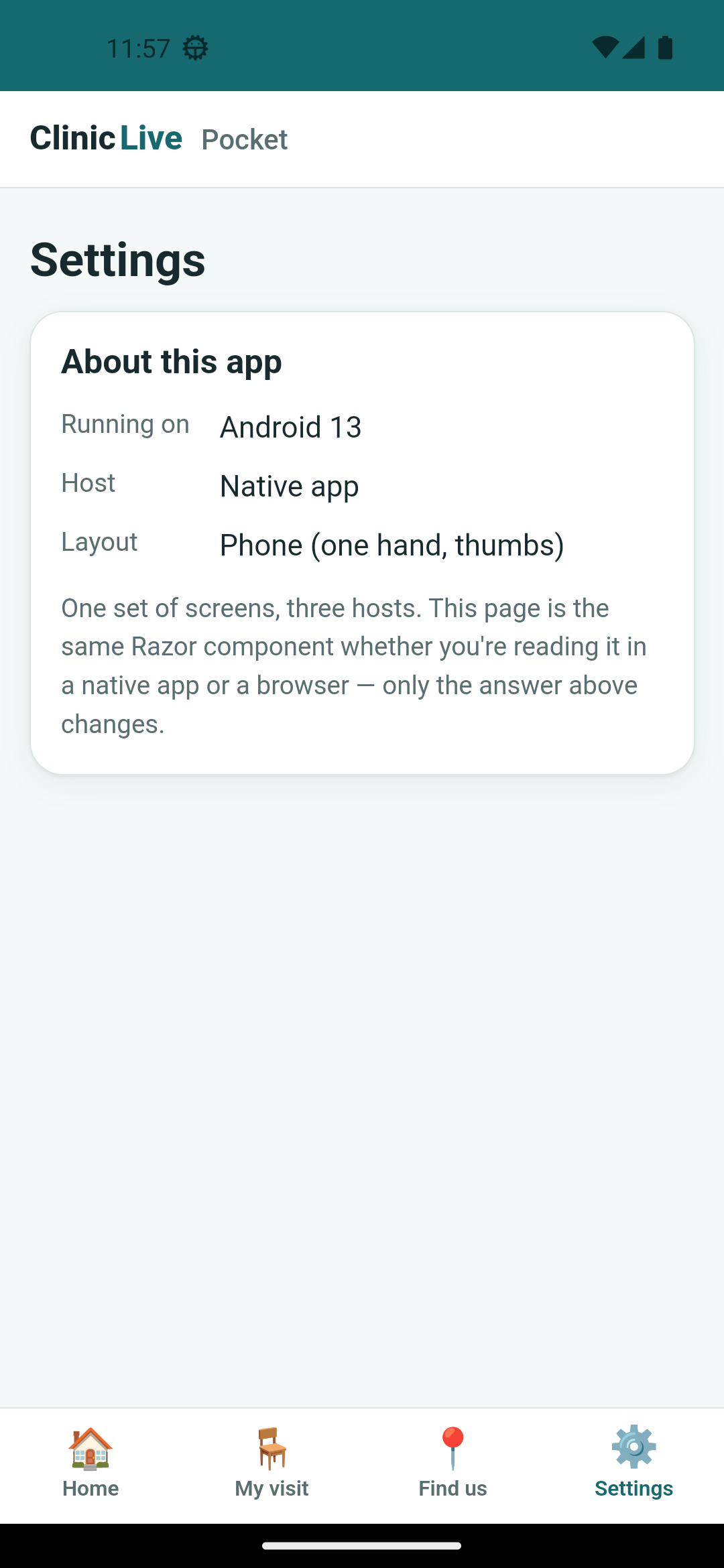 Android emulator
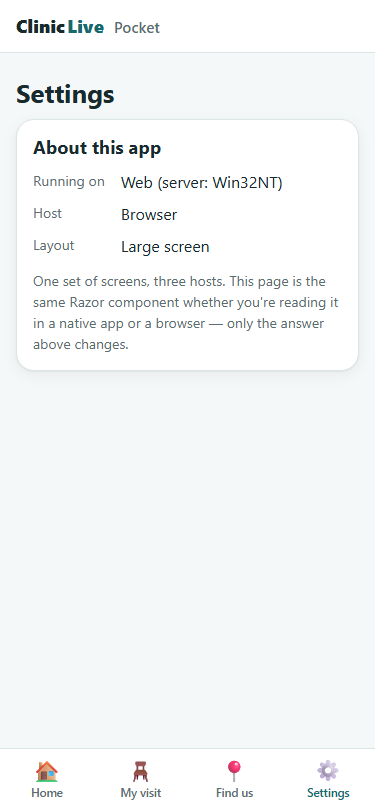 Browser (web host)
Porcelain & petrol, in the platform's own type
The tokens are season two's, moved over
almost line for line — the same porcelain background, petrol primary, coral warning, the same
dark set under prefers-color-scheme — with one deliberate change that the
stylesheet's own header explains:
/* ============================================================
   ClinicLive Pocket — the same "porcelain & petrol" tokens as the
   clinic's web app (From Prompt to Polish, Part 2), re-tuned for a
   phone held in one hand.

   Rules of the house, unchanged:
   - Every color, size and radius is a token.
   - Light and dark are the same system; components don't change.
   - One difference from the web app: the TYPE is the platform's own
     (Roboto on Android, Segoe on Windows). A native app that ships a
     web font feels like a website in a trench coat.
   ============================================================ */

--font: system-ui, -apple-system, "Segoe UI", Roboto, sans-serif;
Season two chose Atkinson Hyperlegible for good reasons, and it stays on the website. But an app that arrives on your phone in a typeface no other app uses announces, before you've read a word, that it's a web page in disguise. The rest of the phone-first re-tuning is small and specific: a fixed bottom tab bar (Home / My visit / Find us / Settings), a content column capped at 32rem, and the confirmation-code input treated as a stage — 2.2rem monospace with wide letter-spacing, because that code is the one thing a patient has to type.
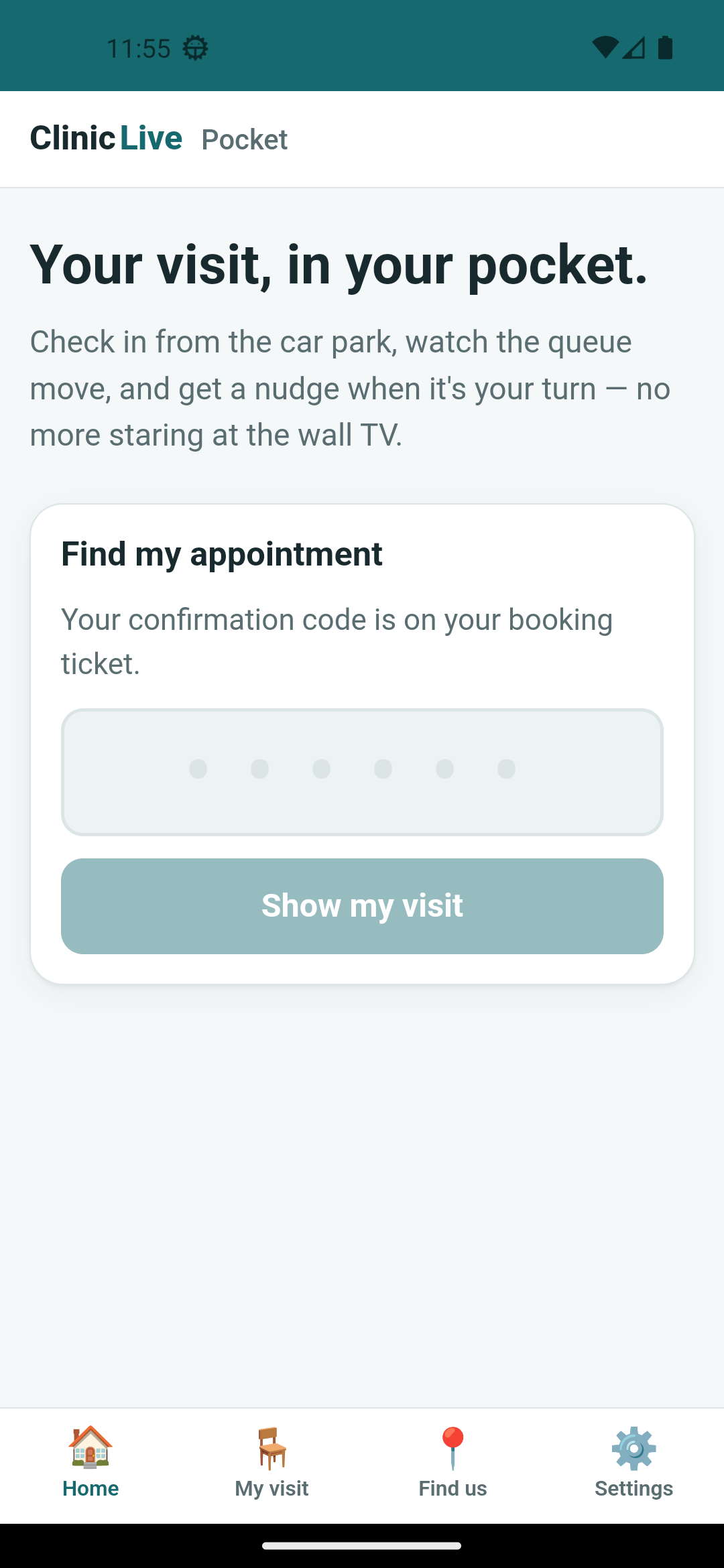
What the first Android screenshot caught
The harness for a phone app is embarrassingly small — adb shell screencap,
adb pull, and a launch via monkey because MAUI mangles the activity
name — and it earned its keep on the very first frame. The status bar was purple. Not petrol:
the Android template's purple, #512BD4, because the status bar is painted by
Android from colors.xml and no CSS token can reach it. The fix lives in the same
file, with its story attached:
<!-- The status bar and splash are painted by Android from THESE, not from CSS.
     The template's purple survived the first screenshot; the tokens live here too. -->
<color name="colorPrimary">#16696F</color>
<color name="colorPrimaryDark">#0F4A4E</color>
<color name="colorAccent">#C96F4A</color>
Catch two was bigger. The header was missing, and so were the tab labels. Windows
showed both, so the CSS was fine — which is exactly what made it confusing. Android hands the
WebView the whole screen, under the status bar and under the gesture bar, and the web's
answer to that, env(safe-area-inset-*), reads zero inside a WebView. Our header
was drawn behind the clock and our tab labels behind the home pill. The fix is not CSS at
all; it's native, in MainActivity:
// The first screenshot: our header sat BEHIND the status bar and the tab labels
// BEHIND the gesture bar. Android hands the WebView the whole screen, and CSS's
// env(safe-area-inset-*) reads 0 inside a WebView — so the insets have to be
// applied here, natively, as padding on the content view.
var content = FindViewById<ViewGroup>(Android.Resource.Id.Content);
if (content is not null)
{
    ViewCompat.SetOnApplyWindowInsetsListener(content, new SystemBarsPadding());
}

/* … */

private sealed class SystemBarsPadding : Java.Lang.Object, IOnApplyWindowInsetsListener
{
    // Android.Views.View spelled out: inside a MAUI project, bare "View" is
    // Microsoft.Maui.Controls.View — the compiler's first complaint on this file.
    public WindowInsetsCompat OnApplyWindowInsets(Android.Views.View? v, WindowInsetsCompat? insets)
    {
        /* … null checks … */
        var bars = insets.GetInsets(WindowInsetsCompat.Type.SystemBars());
        v.SetPadding(bars.Left, bars.Top, bars.Right, bars.Bottom);
        return WindowInsetsCompat.Consumed!;
    }
}
That comment about View is catch three, and it's the fix failing to compile:
inside a MAUI project the bare word View means
Microsoft.Maui.Controls.View, and the AI, writing Android code, reached for
Android's. One fully-qualified name later it built. Catches four and five came from the other
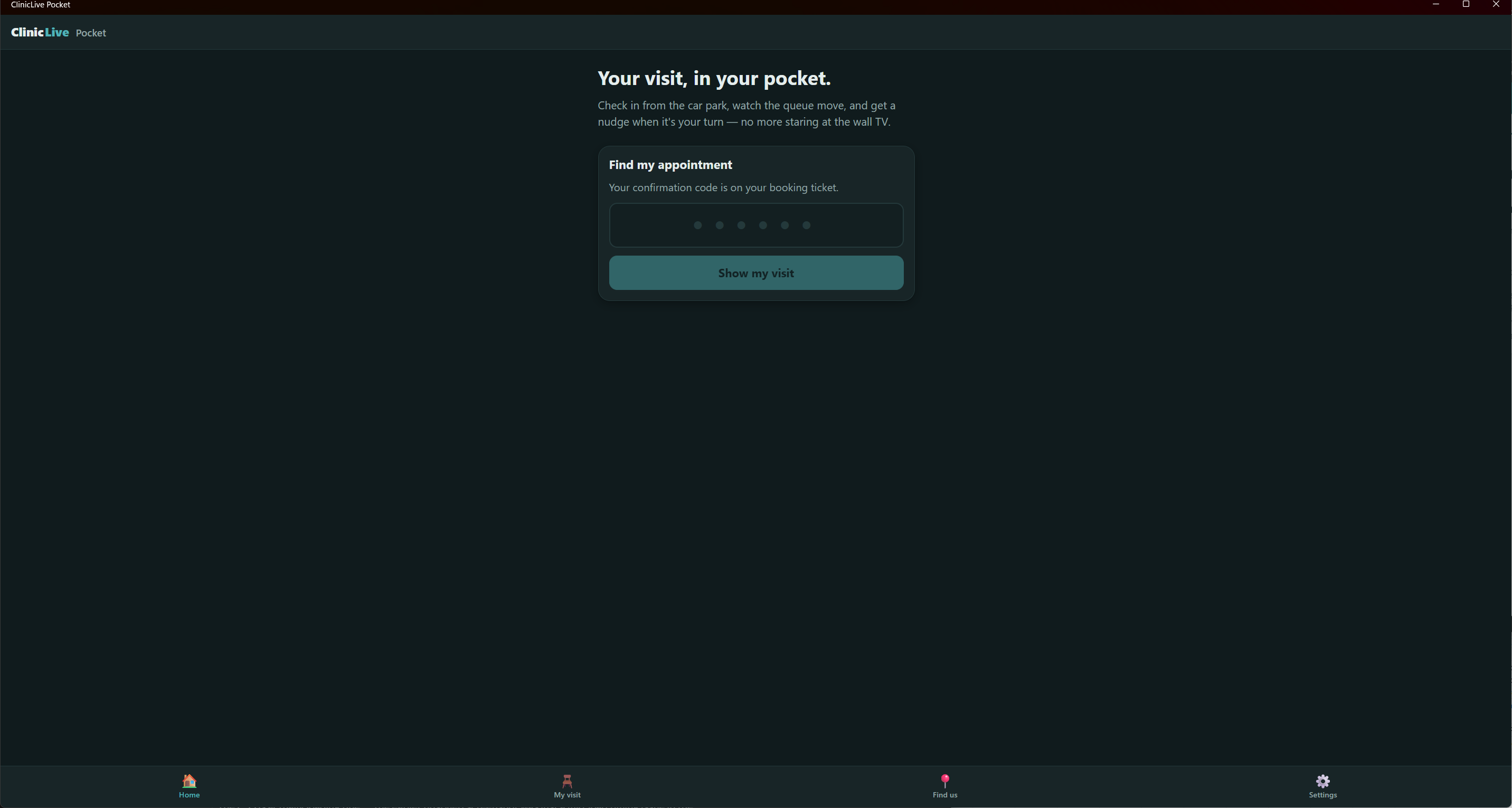
two hosts. On Windows the h1 focus ring from
season two's Part 2 was back from the dead:
that fix was h1:focus, but FocusOnNavigate gives the heading
tabindex="-1", so it now matched the [tabindex] in our ring rule
and won on specificity. Same bug, new face:
/* FocusOnNavigate gives the h1 tabindex="-1" so screen readers land on it — which
   also makes it match [tabindex] above. Same bug as the web app's Part 2, new face. */
h1[tabindex]:focus, h1[tabindex]:focus-visible { outline: none; }
And the web host, photographed by the season-two harness, looked like 1996: unstyled text, no
icon, nothing. Every static file was being served as 200 with a
Content-Length of zero, because the harness ran it with
dotnet run --no-launch-profile — which means no environment variable, which means
Production, where MapStaticAssets expects published assets that don't
exist in a dev checkout. Set ASPNETCORE_ENVIRONMENT=Development explicitly and
the stylesheet came back. Hold onto that one; it bites the server too in Part 3. (A sixth
catch was pure tooling: dotnet run -nologo -- args forwards
-nologo into the app's own arguments, and for one run Chromium cheerfully
photographed a directory listing. Don't mix MSBuild switches into dotnet run.)
What the AI got wrong: three of the catches were the same mistake in
different clothes — assuming the web owns the whole screen. A status bar painted from
XML, a safe area the WebView can't see, a word (View) that MAUI had already
taken: each one is a place where "it's just HTML" stops being true, and none of them show
in the code. The lesson web developers don't have yet: the safe area is the OS's
business, not CSS's. The other two — the focus ring's return and the
Production-by-default web host — are season-two lessons resurfacing, which is its own
lesson: a fix that worked once isn't a fix you can stop checking.
The meter: ≈ $1.30 on season three's running meter. The scaffold and the stylesheet were cheap; the screenshots weren't — every frame the AI looks at is image tokens, and this part looked at a lot of them, on three hosts, before and after five fixes. That ratio is going to be the story of the season.
Checkpoint: git checkout pocket-02 in
the repo: four projects under
src/; dotnet build src/ClinicLive.Pocket -f net10.0-android -t:Install
puts the app on a running emulator, the Windows target builds on Windows, and
dotnet run in ClinicLive.Pocket.Web serves the same screens to
a browser. Open Settings on each and read the answers. Nothing talks to the clinic yet,
and the season-one test suite is untouched at nine green.
The Settings page is proof of architecture, not a feature — and My visit currently says "Looking up…" followed by "The clinic's API arrives in Part 3", because a phone can't talk to Postgres. The clinic needs a door: four small endpoints over the season-one services, DTOs the phone shares by shape, the emulator's peculiar address for "my PC", and a real visit screen — Part 3: The App Needs a Door: A Thin API Over the Clinic.