Previously, in Part 8, the ticket grew a QR code and the app grew a native camera page to read it. Every part so far has quietly assumed two things a phone can't promise: that the app is open, and that the signal is there. This part stops assuming. The app learns to remember your visit between launches, to show something true when the clinic can't be reached — and to say, plainly, how old that truth is. Plus the settings screen Part 3 owed anyone with a real phone.
- Add
IConnectivityInfo: MAUI answers fromConnectivity.Current, the web host fromnavigator.onLineafterEnsureStartedAsync - Add
IAppStoragein two tiers: Preferences for settings and caches, SecureStorage for the code; the browser uses localStorage and says so - Make reads survive real life: a reset keystore returns null, and storage is read in
OnAfterRenderAsync, never during prerender - Add
VisitMemory(code to the secure tier, visit plus UTC stamp to the plain tier) and a "Continue with" card on Home - On
ClinicUnreachableException, show this visit's cached copy with its time, disable check-in while_stale, and add the offline strip - Add the Settings cards: the nudges toggle, Forget my visit, and the
api.baseclinic-server override - Prove it with
adb shell cmd connectivity airplane-mode enable, thendisable - Compare with tag
pocket-09in the repo
The prompt: two capabilities, then spend them
Verbatim from the commit in the
repo (tag pocket-09):
"Two capabilities. IConnectivityInfo — are we online, and tell me
when that changes; the web host can only find out after the first render.
IAppStorage in two tiers — Preferences for harmless settings and caches,
SecureStorage for the one real credential, the confirmation code; the
browser gets localStorage for both and SAYS so. Then use them: Home offers
'Continue with your visit' when a code is remembered; the My-visit tab with
no code opens the remembered one; when the clinic can't be reached, show the
cached visit stamped with the time it was true and disable check-in while
stale; a calm offline strip in the layout; Settings gets a nudges toggle,
'Forget my visit', and the clinic-server override that Part 3 promised for
real phones. Prove it with airplane mode on the emulator."
Same rhythm as every part of this season: the first half of the prompt names capabilities — numbers eight and nine — and the second half spends them. The two design decisions are already in the wording. "Stamped with the time it was true" means a cached visit is never presented as current. "Disable check-in while stale" means it's never acted on. Everything below is those two sentences, implemented.
Model pick: Sonnet, medium effort, for the plumbing — Preferences and SecureStorage are one-line calls in MAUI Essentials and the browser side is ten lines of JavaScript. Opus for two decisions only: that a stale visit is read-only, and the argument for two storage tiers instead of one. Both are the kind of call that looks obvious afterwards and costs real money to get wrong.
Capabilities eight and nine
Connectivity first, because it's the one with a twist. On a phone the answer to "are we
online?" is available the moment the app starts; in a browser it's
navigator.onLine, which needs a browser — and Blazor Server prerenders the
page on the server before there is one. So the interface carries a third member that native
hosts ignore:
/// Capability #8: "can this device reach the internet right now?" A car park has
/// one bar; a basement has none. The answer changes while the app is open.
public interface IConnectivityInfo
{
    bool IsOnline { get; }

    event Action<bool>? Changed;

    /// Hosts that need a browser to answer (the web host asks navigator.onLine over JS
    /// interop) can only start listening after the first render. Native hosts no-op.
    ValueTask EnsureStartedAsync();
}
MAUI's answer is Connectivity.Current from Essentials, which raises an event
when the bars change; EnsureStartedAsync returns a completed task. The web
host's answer registers a DotNetObjectReference with the browser's
online and offline events, scoped per circuit because it is one
visitor's browser. Storage is where the design lives:
/// Capability #9: remember things between launches. Two tiers on purpose —
/// Preferences for harmless settings and caches, SecureStorage for the one thing
/// that IS a credential here: the confirmation code. On Android that's the
/// Keystore-backed store; in a browser it's localStorage with an honest caveat.
public interface IAppStorage
{
    ValueTask<string?> GetAsync(string key);
    ValueTask SetAsync(string key, string? value);

    ValueTask<string?> GetSecureAsync(string key);
    ValueTask SetSecureAsync(string key, string? value);
}
Why two tiers? Because Part 3
made a rule: the code is the credential. Anyone holding 5GYZRH can
see Leo's visit and check him in. "Nudges on" and a cached copy of the queue are harmless
in a plain key-value file; the six characters that unlock an appointment are not. On
Android the secure tier is the Keystore, on Windows it's DPAPI, on iOS it would be the
Keychain — MAUI's SecureStorage picks. The browser gets
localStorage for both tiers, because a web page has no keystore it can use,
and the implementation says so in its own doc comment rather than pretending otherwise.
The MAUI class has one detail worth the whole part:
public async ValueTask<string?> GetSecureAsync(string key)
{
    try
    {
        return await SecureStorage.Default.GetAsync(key);
    }
    catch (Exception)
    {
        // A reset keystore (device restore, cleared credentials) throws on read.
        // Treat it as "nothing remembered" rather than crashing the Home screen.
        return null;
    }
}
The prerender rule
The browser's storage class has its own catch, and it's the second rule this part learned.
Blazor Server renders every page twice: once on the server with no browser attached, then
again interactively. During that first pass JS interop throws
InvalidOperationException — so a storage read in OnInitialized
crashes the web host and works perfectly in the MAUI app, where there is no prerender.
The web AppStorage swallows that exception and answers "nothing", and every
screen that reads storage moved its read to where the browser exists:
protected override async Task OnAfterRenderAsync(bool firstRender)
{
    // After render, not during: the web host's storage talks to the browser.
    if (firstRender)
    {
        _remembered = await Memory.GetCodeAsync();
        if (_remembered is not null)
        {
            StateHasChanged();
        }
    }
}
The layout does the same for connectivity — EnsureStartedAsync runs on first
render, then IsOnline is read. One rule, stated once: on the web host, a
storage read is not a function of the key alone; it's a function of when you ask.
What the app remembers
Between the interface and the screens sits one small shared class, VisitMemory,
so no page has to know which tier a thing lives in:
public async ValueTask RememberAsync(VisitDto visit)
{
    await storage.SetSecureAsync(CodeKey, visit.Code);
    await storage.SetAsync(CacheKey, JsonSerializer.Serialize(new Cached(visit, DateTime.UtcNow)));
}

public async ValueTask<Cached?> GetCachedAsync()
{
    var json = await storage.GetAsync(CacheKey);
    if (string.IsNullOrEmpty(json))
    {
        return null;
    }
    try
    {
        return JsonSerializer.Deserialize<Cached>(json);
    }
    catch (JsonException)
    {
        return null;   // an older app version wrote a shape we no longer read
    }
}
The code goes to the secure tier; the whole VisitDto plus a UTC timestamp goes
to the plain tier as JSON. The Visit screen calls RememberAsync on every
successful load, so the cache is always the last thing the clinic actually said. And Home
grows a card:
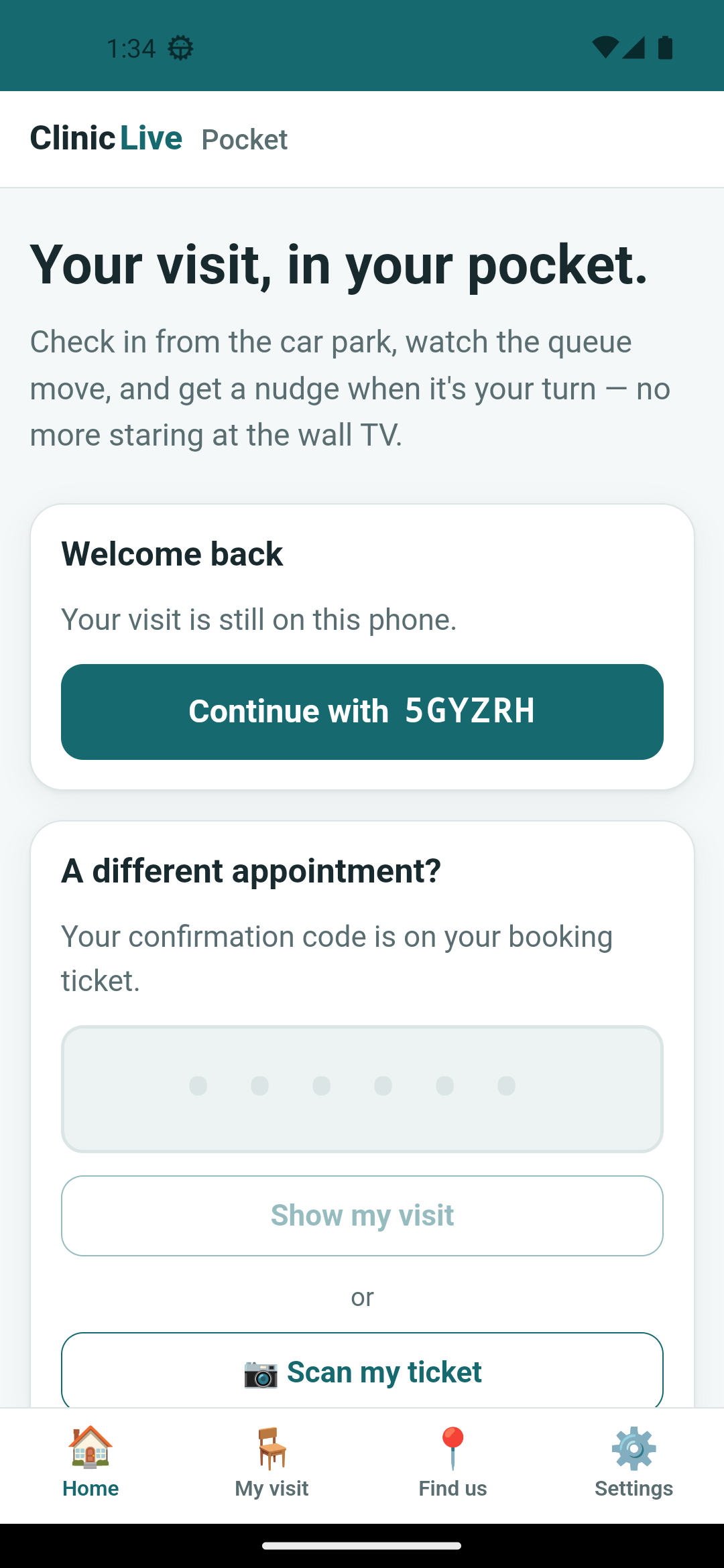
replace: true, so Back doesn't bounce you into a loop.
Stale means read-only
Here's the payoff. When the API throws ClinicUnreachableException and the
screen has nothing yet, it asks the memory — but only for this visit's memory,
never someone else's:
catch (ClinicUnreachableException)
{
    _unreachable = true;
    // Part 9: no signal, but maybe a memory. Only THIS visit's memory counts.
    if (_visit is null && await Memory.GetCachedAsync() is { } cached && cached.Visit.Code == Code)
    {
        _visit = cached.Visit;
        _stale = true;
        _staleSince = cached.StoredAtUtc.ToLocalTime().ToString("HH:mm");
    }
}
Three things then follow from _stale. A notice appears above the card with the
timestamp in it. The check-in button gets disabled="@(_busy || _stale)" — you
never act on a queue position that might be twenty minutes old. And the "reconnecting…"
pill from Part 4 is hidden while stale,
because one warning is enough. Up in the layout, a strip under the header says the same
thing in fewer words. Its CSS comment is the design brief: a calm strip, not a red alarm
— the app still works. Then the emulator's airplane mode does the proving:
adb shell cmd connectivity airplane-mode enable
# …screenshot…
adb shell cmd connectivity airplane-mode disable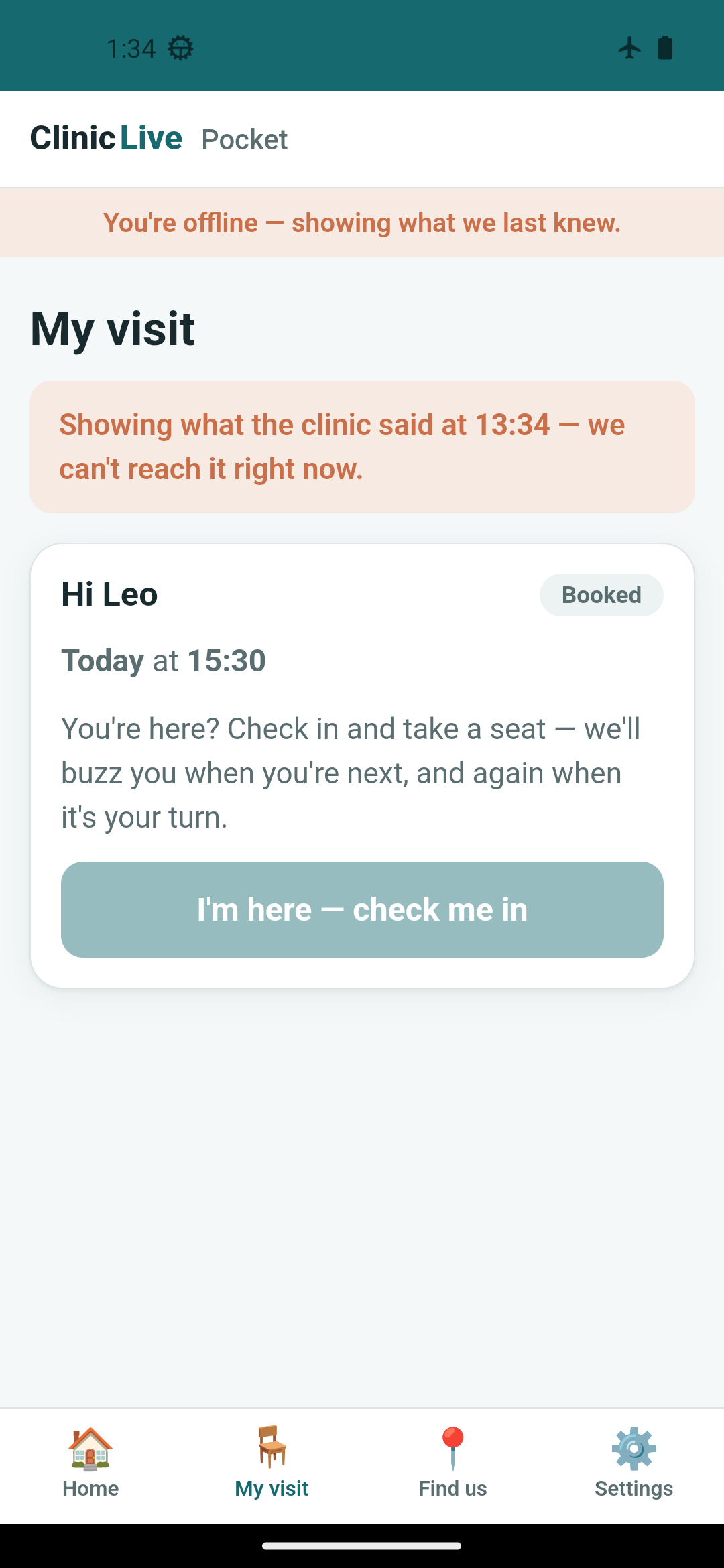 Airplane mode on
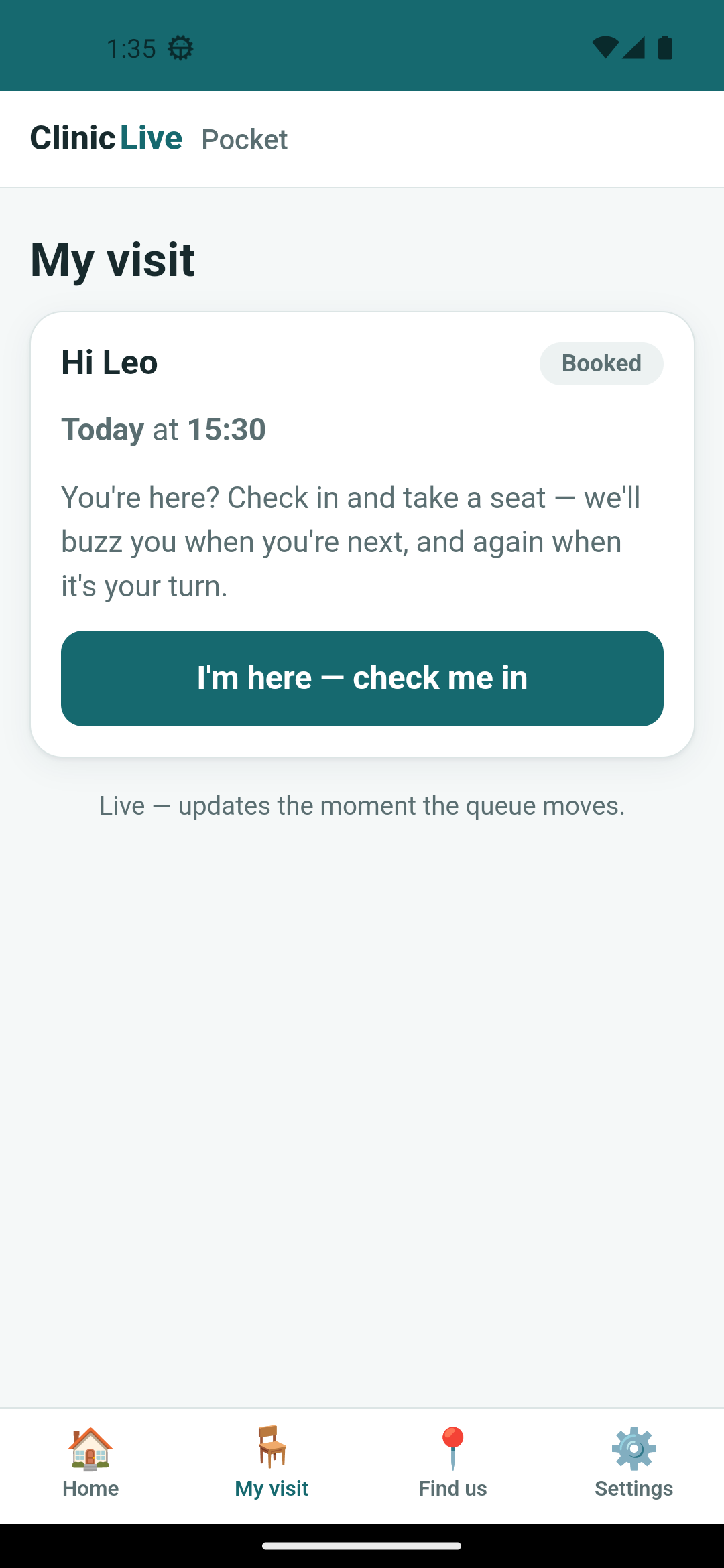 Airplane mode off
Settings, at last
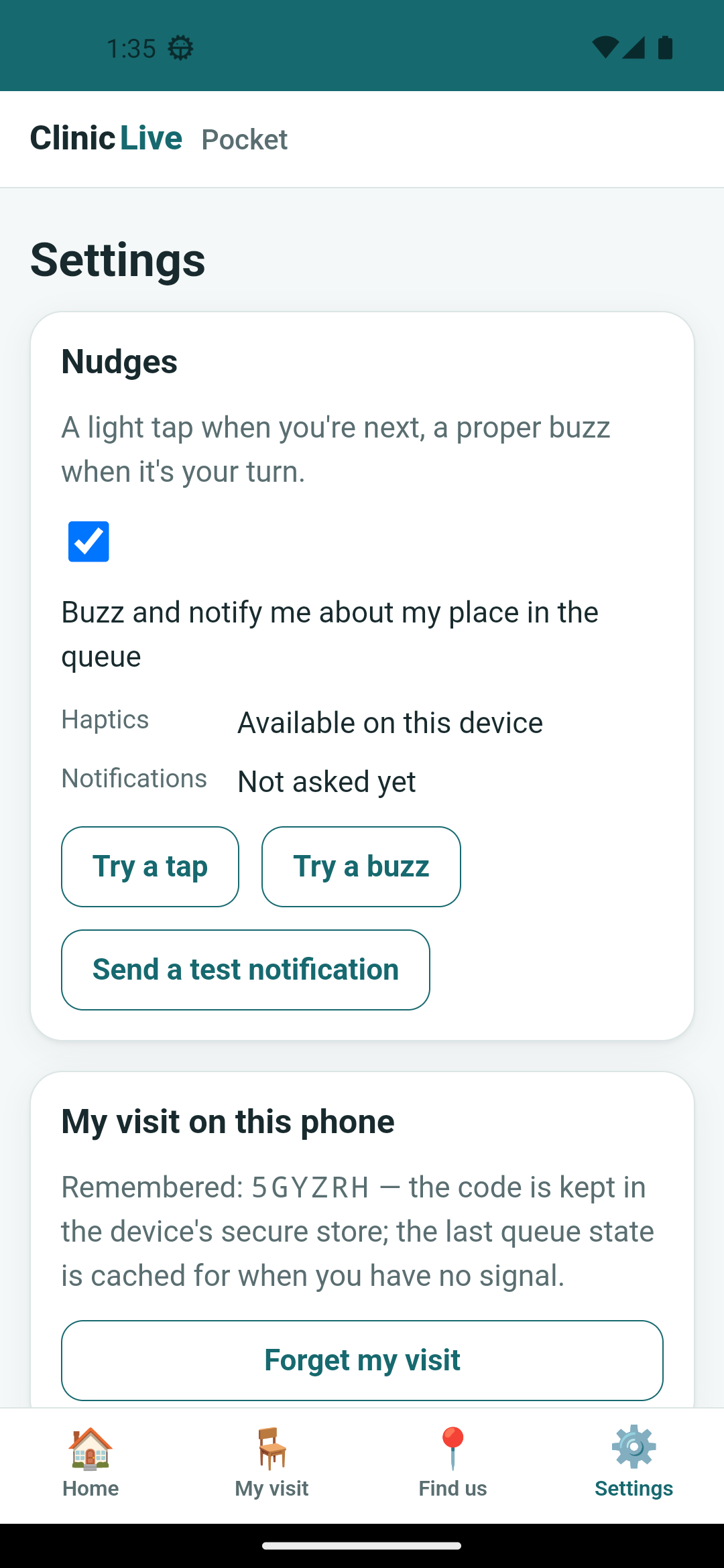
Three cards land on the Settings screen. A nudges checkbox that gates Part 5's
NudgeIfItMattersAsync — the Visit screen checks
Memory.NudgesEnabledAsync() before buzzing. A "My visit on this phone" card
with Forget my visit, which clears both tiers. And the one Part 3 promised: a
clinic-server override for a physical phone, which can't reach your PC as
10.0.2.2 the way the emulator does. It's a Preferences key read once, at
startup:
public static Uri Base
{
    get
    {
        var saved = Preferences.Default.Get<string?>("api.base", null);
        return !string.IsNullOrWhiteSpace(saved) && Uri.TryCreate(saved, UriKind.Absolute, out var uri)
            ? uri
            : Default;
    }
}
"Takes effect next launch" is honest rather than lazy: the HttpClient is a
singleton built in MauiProgram with that base address, and swapping it live
would mean re-creating the SignalR connection and every service that holds it. A restart is
the cheaper contract, and the screen says so.
What the AI got wrong: three things, all in the gap between "works on
my emulator" and "works on a phone that's had a life." One: SecureStorage.GetAsync
throws after a keystore reset — a restored phone, cleared credentials — and the
first draft would have crashed the Home screen for exactly the users who most needed
the app to open. Wrapped as "nothing remembered". Two: Home and Settings read storage in
OnInitialized, which is fine in MAUI and fatal under the web host's
prerender; moved to OnAfterRender. Three: the nudges checkbox rendered in
Android's blue, not ours — accent-color: var(--primary), one line. The
lesson: storage is not a dictionary. It has a when (after render), a
where (which host), and a failure mode that isn't "empty".
The meter: ≈ $6.10 on season three's running meter. The airplane-mode
choreography — enable, wait, shoot, disable, wait, shoot — was the expensive part; the
two storage classes and VisitMemory were cheap, which is what one-line
Essentials calls are for.
Checkpoint: git checkout pocket-09 in
the repo: open a visit, kill
the app, relaunch — Home says "Welcome back". Turn on airplane mode with the visit open
and watch the strip, the stamped notice and the disabled button arrive; turn it off and
watch them leave. Settings has the nudges toggle, Forget my visit, and the clinic-server
box for a real phone. All 28 tests still green — this part touched no server code.
The phone is finished. But this app has had a third host since Part 2, and its very first Windows screenshot — a phone layout stretched across a 4K monitor — has been waiting eight parts for an answer. One window size, one CSS breakpoint and a page for the reception desk: Part 10: Same App, on the Desk: Windows, One Breakpoint and a Waiting-Room Page.